Clicking the color sample placed right from the parameter Color in the Picture setings dialog box opens the following popup menu:
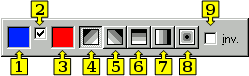
| 1 | Selection of a picture background color. |
| 2 | Allows to use a gradient effect defined by means of the controls 3 up to 9. |
| 3 | Selection of
2nd gradient color. Clicking the color sample placed below the caption
opens the color palette.
Clicking a color in the palette sets the color as the 2nd gradient color
of the picture. As the 1st gradient color, there is used the picture background color (1). |
| 4...8 | Selection of gradient effect type. |
| 9 | Inverse gradient effect. |
Related pages: