Translation:
The object can have, in addition to 3 palettes, up to 5 functions. In most cases, their names correspond to functions from the script. For example: PosX = %HI_SetPosX.
The functions take a single parameter: a D2000 object or a local variable that can be controlled by an expression.
Meaning: This solution does not burden communication with the script—it does not fill the queue of HI messages coming from the script and the kernel. As a result, it places a significantly lower load on the HI process.
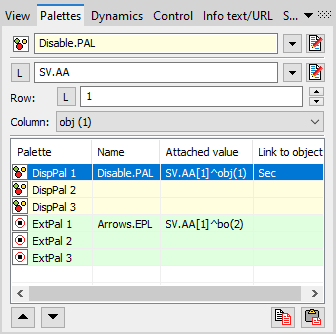
 Change order within the pallet type
 Copy connected value between palettes
Implemented functions:
| Enable | The Enable function disables/enables access to the graphical object. | %HI_SetEnable |
| Visible | The Visible function hides/shows the graphical object. | %HI_SetVisible |
| PosX | The PosX function sets the X coordinate of the graphical object. | %HI_SetPosX |
| PosY | The PosY function sets the Y coordinate of the graphical object. | %HI_SetPosY |
| PosX+ | The PosX+ function shifts (offsets) the X coordinate of the graphical object. | %HI_SetPosX (%HI_GetPosX+hodnota) |
| PosY+ | The PosY+ function shifts (offsets) the Y coordinate of the graphical object. | %HI_SetPosY(%HI_GetPosY+hodnota) |
| SizeX | The SizeX function sets the width of the graphical object | %HI_SetSizeX |
| SizeY | The SizeY function sets the height of the graphical object | %HI_SetSizeY |
| DistX | The DistX function sets the distance from one point of the object to the next point along the X-axis. | %HI_SetDistX |
| DistY | The DistY function sets the distance from one point of the object to the next point along the Y-axis. | %HI_SetDistY |
| LineWidth | The LineWidth function sets the line thickness. | %HI_SetLineWidth |
| Text | The SetText function sets the text of the graphical object. | %HI_SetText |
| SetLineTerminator | The SetLineTerminator function sets the line termination style, including the termination of individual lines in a multi-line object. | %HI_SetLineTerminator |
| ForeColor | The ForeColor function sets the foreground color of the graphical object. | %HI_SetForeColor |
| BackColor | The BackColor function sets the background color of the graphical object. | %HI_SetBackColor |
| BackColor2 | The BackColor2 function sets the secondary gradient color of the graphical object. | %HI_SetBackColor2 |
| TextColor | The TextColor function sets the text color of the graphical object. | %HI_SetTextColor |
Príklad:
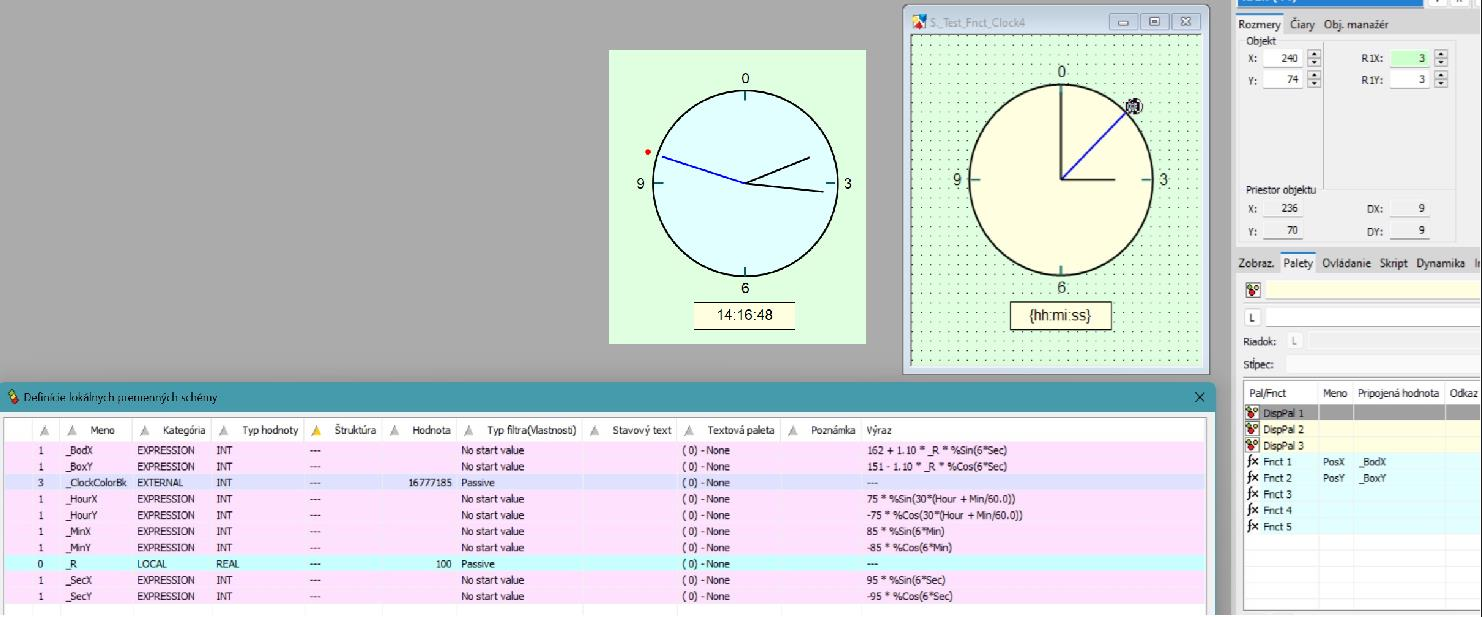
Here is an example of a simple clock in a scheme with its center at **[100,100]**, implemented **without using a script**—the highlighted point moves simultaneously with the second hand.
Related pages:
Pridať komentár