Historical value export
The following menu is opened after clicking the Export button.
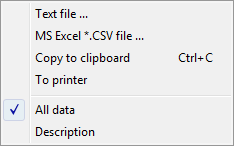
This menu allows you to save the displayed values of an archive object in a text file (Text file item), CSV file (MS Excel *.csv file item), copy them to the clipboard (Copy to clipboard item) or print them (To printer item).
It is also possible to save all values of the table – All data item – or only the selected values (lines).
The Description item means that the data export will display a heading with the name of the object and the technical unit.
Related pages:
Pridať komentár