Edit a time channel item
Editing is performed in a window with an identical or similar appearance to the following window. Differences can be in value labels (given by a status text) or, in case of numerical values, radio buttons are replaced by an input edit box.
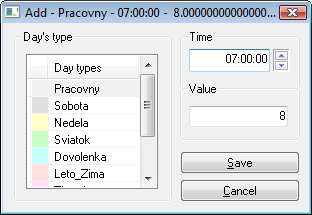
You can set three items:
- Day type - selection from the day type list. It defines the type of day when the given value takes effect
- Time - it defines what time of the day the given value takes effect
- Value - it defines a time channel value
Settings are saved after clicking the Save button. If the settings involve a day displayed in the graphic flow, then this flow will be redrawn according to the settings. To close the window, click the Cancel button.
Related pages:
0 komentárov