In the D2SMC menu it is possible to open a dialog with D2000 instance settings:

Click on the item to display the dialog:
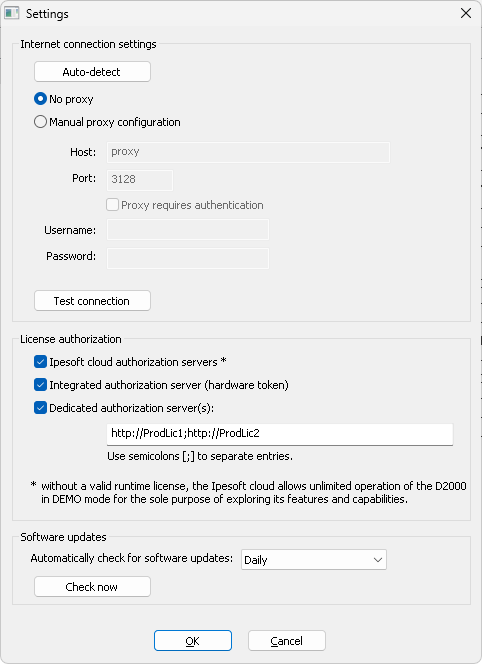
Internet connection settings
If the computer can only access the Internet through a proxy server, select Manual proxy configuration and fill in the address and port of the proxy server. Contact your network administrator for proxy information. If the proxy server requires authorization, you can also enter a name and password.
The Test connection button can be used to test the connection.
License authorization
In this section, you can configure which license servers an existing license will be authorized against:
- Ipesoft cloud authorization servers - Ipesoft public license servers located in the cloud.
- Integrated authorization server - License server integrated in the D2000 Server.
- Dedicated authorization server(s) - Dedicated license server with its own hardware key. They are entered in the format http://server_name, and it is also possible to enter multiple redundant servers separated by a semicolon, e.g., http://ProdLic1;http://ProdLic2.
Software updates
Here, you set the period for checking newer versions of the D2000. The options are: check daily, weekly, monthly, or never check.
The automatic check is performed by the D2000 Server process according to the configured period. If patches are available for the installed version, this information is set in the SystemInfo object, and then a process alarm is generated on that object.
After clicking the Check now button, the check is performed immediately, and a window with information about the availability of the patches as well as about the newer version of D2000 is displayed.
Telemetry
The D2000 system allows sending diagnostic data to IPESOFT.
Enabling/disabling sending diagnostic data to IPESOFT on the Windows platform is controlled by the Enabled key in the Registry branch Computer\HKEY_LOCAL_MACHINE\SOFTWARE\Ipesoft\<D2000_version>\InstanceConfig\DiagCollect.
On the Linux platform, this setting is in the /opt/d2000/instance.properties file as the InstanceConfig.DiagCollect.Enabled item.
Sending is enabled by default; it can be disabled by setting Enabled to 0 (Windows) or False (Linux).
The data is sent by the D2000 Server process via the REST API to the domain https://d2cloud.ipesoft.com/diagcollect, they are in JSON format, they do not contain any sensitive data. Sending time is 1 hour.
The following information is sent:
- application start parameters
- D2000 version and product information
- unique anonymous installation ID
- name, size, and time of modification of the binary file of the D2000 Server
- start time of D2000 Server
- status of D2000 Server
- number of seconds from the D2000 Server start
- operating system version
- processor platform
By allowing diagnostic data to be sent to IPESOFT, it is possible to bypass the time limit of the DEMO license operation. Each successful submission shifts the expiration time of the DEMO license to the current time +2 hours.
This feature only applies to the current (latest published) version of D2000.
Sample of real sent data:
{
    "signedcontent":{
        "payload":{
            "command_line":"D:\\D2000\\D2000_EXE\\bin64\\kernel.exe /CTestAEdaAsa /X1 /ESQLANYs_ASA12s_ststapp101v;SQLANYs_ASA12a_ststapp101v",
            "d2000_level":"RUNTIME",
            "d2000_product":"BASIC",
            "d2000_release":"P180413057-01",
            "d2000_version":"V11.02.057",
            "iid":"NG5fp1v6ysbsRo+Yzy0dsg==",
            "image_name":"kernel.exe",
            "image_size":28440595,
            "image_ts":"2018-04-16T08:53:18.000Z",
            "kernel_start_ts":"2018-04-19T06:18:12.255Z",
            "kernel_state":"RS_HS",
            "kernel_uptime":3908,
            "os_info":"Windows 8.1",
            "platform":"x64",
            "subject":"d2000_diag_v1"
        },
        "signature_version":1,
        "nonce":"jdDTHh8svU/wFJog/Sk1/A=="
    },
    "signature":"4L4YPIhwJN3o8tagSrWVsjVSft7iYL6Q8/V+B6DnRbydBUaLBYfsTMbGVoVcl7DOjxGg8VS5RYJj54CrMHJ2BQ=="
}
Pridať komentár