Interval for selecting values from the archive
If no predefined time period is suitable for selecting values from the archive (e.g., this hour, last 2 hours, etc.), the user can define their own interval.
To set a user-defined time interval
- Select Choose custom item from the Select time interval dropdown box.
- The following dialog box allowing the user to define a time interval is opened.
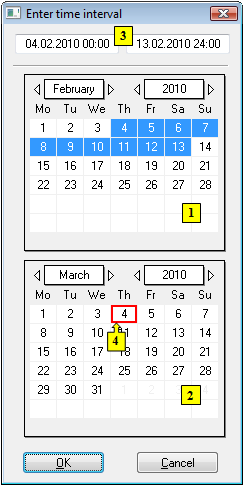
- In the calendar (1), select the required month and year of the time interval beginning (click the items showing year and month). The red item (4) shows the current date.
- In the calendar (2) select the required month and year of the time interval end.
- In the calendar (1) click a day - the time interval beginning and hold down the mouse button.
- In the calendar (2) click a day - the time interval end and release the mouse button.
- Time interval may also be defined in the input fields (3) showing required time parameters (3).
- To confirm your settings, click the OK button.
Note 1:
A time interval within one month can be defined in one of the calendars.
Note 2:
At the same time, you can open several dialog boxes showing values from the archive - it allows you to browse the data of various objects of Historical value type or one object within different time periods.
Pridať komentár