D2000 processes can communicate with a D2000 Server process in two ways:
- via shared memory (e.g. processes running on the same computer as the D2000 Server)
- through TCP/IP or Dual TCP/IP communication
For processes communicating in the other way, the D2000 Application Manager process enables you to allow clients to log in only from specific IP addresses. In the current version of the D2000 system, a maximum of 10 networks can be defined.
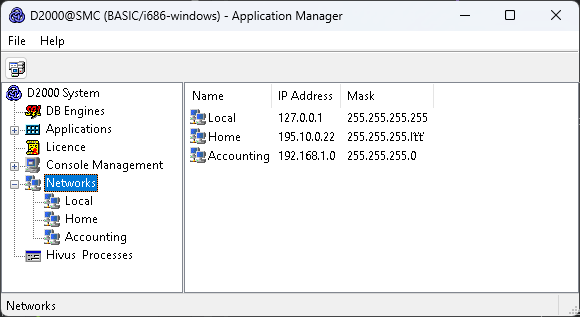
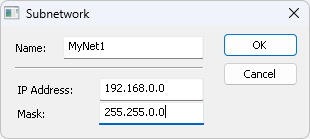
The network is defined by its name, IP address and mask. To define a network, use the following dialog box, which appears when you select New SubNetwork from the context menu that is opened by right-clicking on Networks.
In the network itself, it is possible to define several so-called access ranges, i.e allow or deny certain IP addresses of computers on this network.
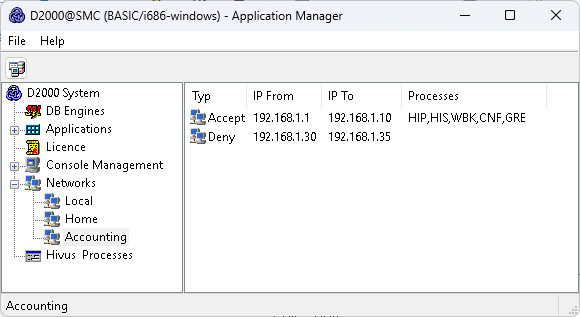
The range is defined in the following dialog, which opens after selecting New IP Access Range from the context menu opened by right-clicking on the network.
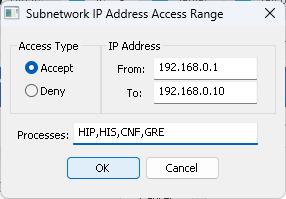
The Processes entry field allows you to enter process extensions that are allowed/denied. If the field is empty, the rule applies to all process types.
The D2000 Server process, therefore, checks the IP addresses of the clients (processes) that connect to it using TCP/IP or Dual TCP/IP communication as follows:
- If no network is configured, IP address checking is not performed.
- If at least one network is configured, the client is checked to see if it belongs to one of the defined networks:
- If the client does not belong, the connection will be rejected.
- If the client belongs, then it is further checked that all the networks to which they belong meet one of the following conditions:
- No ranges are defined in the network.
- At least one Accept type range is defined in the network to which the client's IP address belongs, and there is no Deny type range to which the client's IP address belongs
If the range is found and the Processes field is empty, the process type is not checked. Otherwise, the appropriate client type (e.g., CNF for a D2000 CNF process) must be found to accept or deny access.
The client will be connected if at least one of the above conditions is valid. Otherwise, the connection will be rejected, and the message "Client rejected with error PROCES_TCPIP_DENY" will be written to the log file of the D2000 Server process (kernel.log file).
WARNING
- Defining or editing networks and ranges is only allowed while the D2000 Server process is running.
- When the application server is redundant, definition and editing are allowed only for the HOT Server, that being a D2000 Server process in the HOT (HS) state. After editing, all changes are sent from the HOT Server to the STANDBY Server.
- A maximum of 255 IP ranges can be configured.
- When using the D2000 SAS server, the original IP addresses of the clients connecting via the D2000 SAS server are checked. The IP address of the D2000 SAS server is checked when it is connecting to the D2000 Server.
Example:
| SubNetwork | IP Address | Mask | Range | Possible connection | |||||||||
|---|---|---|---|---|---|---|---|---|---|---|---|---|---|
| Local | 127.0.0.1 | 255.255.255.255 | none | local clients | |||||||||
| Production | 192.168.0.0 | 255.255.255.0 | none | clients with IP addresses 192.168.0.1 through 254 | |||||||||
| Accounting | 192.168.1.0 | 255.255.255.0 |
| clients with IP addresses 192.168.1.1 through 100, except IP addresses 192.168.1.30 to 35 | |||||||||
| Director_Home | 195.10.0.22 | 255.255.255.255 | none | a client with IP address 195.10.0.22 |
Note 1:
By default, the D2000 Application Manager process connects to the D2000 Server process over TCP/IP. Hence, before configuring networks using the D2000 Application Manager process, it is necessary to add a network with the 127.0.0.1 IP address and the mask 255.255.255.255. If this network is not configured, the D2000 Application Manager process will not connect to the D2000 Server process after turning it off and on (the error message PROCES_TCPIP_DENY is displayed). In this case, the D2000 Application Manager process can only be started with the /M startup parameter, which connects to the D2000 Server process via shared memory.
Note 2:
The procedure in Note 1 does not work in a Windows Terminal Services environment. We recommend one of the following alternatives:
- Connect to the console session (mstsc.exe/console) and run the D2000 Application Manager process with the /M parameter
- Manually modify the ConsolesInfo.txt file located in the D2000 program directory - delete the [SUBNET] and [IPACCESS] sections and either restart the D2000 Server process or use the REFRESH_LICENCE command.
Note 3:
On all supported platforms (Windows/Linux/Raspberry), the REFRESH_LICENCE command can be used after manually editing the ConsolesInfo.txt file.
Pridať komentár