 3D frame.
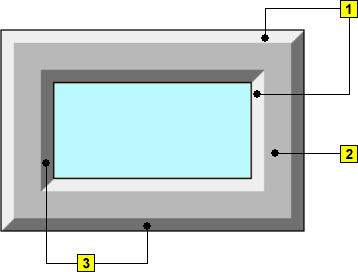
Frame is a 3D graphic object. An example of a frame is shown in the following figure.
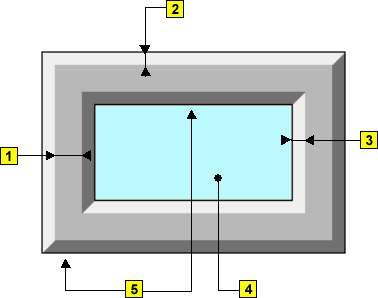
| 1 | 3D frame width |
| 2 | 3D frame height |
| 3 | 3D object down-grade |
| 4 | 3D object fill |
| 5 | Frame |
3D frame.3D frame parameters are being defined in the palette Object properties.
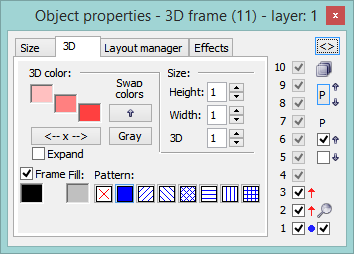
3D color
Definition of 3D frame colors.
| Example: | |
 |
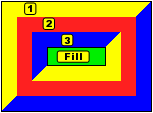 |
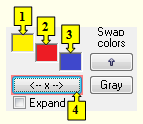
| 1 | 1st color of the 3D frame (see the example above). |
| 2 | 2nd color of the 3D frame (see the example above). |
| 3 | 3rd color of the 3D frame (see the example above). |
| Swap colors | Exchange of 1st color (1) for 3rd color (3). |
| 4 | Selection of 2nd color. The 1st and 3rd
colors are to be defined automatically as follows:
|
| Gray | Automatic setting of 3D colors in grey shades. |
| Expand | It disables 1. and 3. color. These colors are calculated according to 2. color. |
Frame
Setting of a color of the graphic object frame (outline).
Fill
Selection of a color of the graphic object fill.
Pattern
Selection of a pattern - none, full, cross-hatching, ....
Size
Height
The spin button to define a height of the graphic object (1-99).
Width
The spin button to define a width of the graphic object (1-99).
3D
The spin button to define a down-grade of the graphic object (1-99).
Drawing of 3D frame is not supported
in Thin Client.
For more rules see the page Drawing rules and object properties for D2000 Thin Client.
Drawing graphic objects |