Help is set on 2 levels:
The process D2000 Server reads the following parameters from the system registry during its start. Values are adjusted using the process D2000 Application Manager (D2Smc.exe).
| Parameter | Possible Values | Parameter Meaning |
|---|---|---|
| SrvApplHelpType | HelpFileChm | Selection of Application Help Types - NoHelp, HelpFileChm, HelpWebServerConfluence, HelpWebServerHtml, HelpSharedDir, HelpLocalApplDir, HelpLocalAnyPath |
| SrvApplHelpPath | Set the location of the help by type SrvApplHelpType. | |
| SrvApplHelpMainPage | Default application help page. It is entered in the form: "html\main_page.htm" (mandatory form for type HelpFileChm). F for html helps "main_page" is enough. | |
| SrvD2000HelpType | HelpWebIPS | Selection of help types for D2000 - HelpWebIPS, HelpWebServerHtml, HelpSharedDir, HelpLocalD2000Dir, HelpLocalAnyPath |
| SrvD2000HelpPath | https://doc.ipesoft.com/label/D2DOCV | Set the location of the help by type SrvD2000HelpType. |
The setup consists of 2 parts:
| Key Word | Meaning | SrvD2000HelpPath - Help location settings |
|---|---|---|
| HelpWebIPS | Ipesoft webserver (Confluence). Current help available on the website of Ipesoft Ltd. It is continuously updated. | The path is defined by the text "https://doc.ipesoft.com/label/D2DOCV" and cannot be changed. The following is added to the final destination path as follows: the D2000 version is added to the path, e.g.: 11 and the help language e.g.: SK. Example of final location: https://doc.ipesoft.com/label/D2DOCV22SK/ |
| HelpWebServerHtml | Web server (HTML). Help is available through some websites. | The path leads to an Internet address. It must be entered. E.g.: https://MyPages/help The physical location is completed as follows: the help language is added to the path, e.g.: SK + keyword label Example of the final location: https://MyPages/help/SK/label/ |
| HelpSharedDir | Shared directory (HTML). Help directory located on a network drive common to multiple D2000 consoles that have access to it. | The path points to any location on the network drive. It must be entered. E.g.: S:\D2000_HELP. The physical location is completed as follows: the help language is added to the path, e.g.: SK + keyword label Example of final location: S:\D2000_HELP\SK\label\... |
| HelpLocalD2000Dir | HELP installation directory D2000 (HTML) | The path points to the location referenced by the D2000 installation and cannot be changed. E.g.: C:\D2000\D2000_V11.2.57\D2000_EXE\HELP. The physical location is completed as follows: the help language is added to the path, e.g.: SK + keyword label Example of the final location: C:\D2000\D2000_V11.2.57\D2000_EXE\HELP\SK\label\... |
| HelpLocalAnyPath | Local Directory (HTML). A help directory located on a local or network drive that can be accessed by the D2000 console. | The path points to any location on the local disk. It must be entered. E.g.: C:\D2000_HELP. The physical location is completed as follows: the help language is added to the path, e.g.: SK + keyword label Example of final location: C:\D2000_HELP\SK\label\... |
Language of the Help
When the help is opened, a language mutation is selected depending on which language the user uses for the client process (HI, CNF, ...) The following are allowed:
SK - for Slovak and Czech language
EN - for other languages
The setup consists of 3 parts:
| Keyword | Meaning | SrvApplHelpPath - Help location settings |
|---|---|---|
| NoHelp | Without help | Not specified |
| HelpFileChm | HELP application directory (CHM). It uses chm files as help. | The path points to the location referenced by the D2000 application and cannot be changed. E.g.: C:\D2000\D2000_V11.2.57\D2000_APP\Demo\HELP. |
| HelpWebServerConfluence | Web server (Confluence). Help available through any website created in Confluence | The path leads to an Internet address. It must be entered. The physical location is ultimately required to comply with Confluence rules |
| HelpWebServerHtml | Web server (HTML). Help is available through some websites. | The path leads to an Internet address. It must be entered. E.g.: https://MyPages/help The physical location is completed as follows: the help language is added to the path, e.g.: SK + keyword label Example of the final location:https://MyPages/help/SK/label/ |
| HelpSharedDir | Shared directory (HTML). Help directory located on a network drive common to multiple D2000 consoles that have access to it. | The path points to any location on the network drive. It must be entered. E.g.: S:\MY_HELP. The physical location is completed as follows: the help language is added to the path, e.g.: SK + keyword label Example of final location: S:\MY_HELP\SK\label\ ... |
| HelpLocalApplDir | HELP application directory (HTML) | The path points to the location referenced by the D2000 application and cannot be changed. E.g.: C:\D2000\D2000_V11.2.57\D2000_APP\Demo\HELP. The physical location is completed as follows: the help language is added to the path, eg: SK + keyword label Example of final location: C:\D2000\D2000_V11.2.57\D2000_APP\Demo\HELP\SK\label\...... |
| HelpLocalAnyPath | Local Directory (HTML) A help directory located on a local or network drive that can be accessed by the D2000 console. | The path points to any location on the local disk. It must be entered. E.g.: C:\MY_HELP. The physical location is completed as follows: the help language is added to the path, e.g.: SK + keyword label Example of final placement: C:\MY_HELP\SK\label\... |
Language of the Help
When the help is opened, a language mutation is selected depending on which language the user uses for the client process (HI, CNF, ...) The following are allowed:
SK - for Slovak and Czech language
EN - for other languages
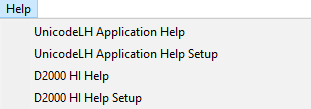
It is entered by selecting the activity in the submenu "Help" of the client process, e.g. in HI:
The settings window at the top contains settings on the server side and at the bottom on the client side.
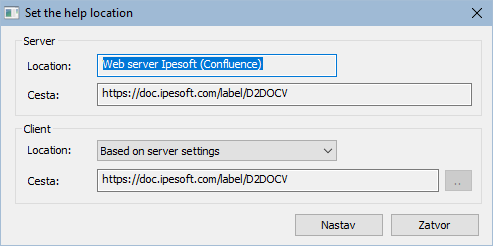
| Location | Meaning | Path - Set the location of help |
|---|---|---|
| D2000 server setting | Setting according to the D2000 server | The location is taken from the settings on the server |
| Ipesoft webserver (Confluence). | Current help available on the website of Ipesoft Ltd. It is continuously updated. | The path is defined by the text "https://doc.ipesoft.com/label/D2DOCV" and cannot be changed. The following is added to the final destination path as follows: the D2000 version is added to the path, e.g.: 11 and the help language e.g.: SK. Example of final location: https://doc.ipesoft.com/label/D2DOCV22SK/ |
| Web server (HTML) | Help is available through some websites. | The path leads to an Internet address. It must be entered. E.g.: https://MyPages/help The physical location is completed as follows: the help language is added to the path, e.g.: SK + keyword label Example of the final location: https://MyPages/help/SK/label/ |
| Shared directory (HTML). | Help directory located on a network drive common to multiple D2000 consoles that have access to it. | The path points to any location on the network drive. It must be entered. Eg: S:\D2000_HELP. The physical location is completed as follows: the help language is added to the path, e.g.: SK + keyword label Example of final location: S:\D2000_HELP\SK\label\... |
| HELP installation directory D2000 (HTML) | HELP installation directory D2000 (HTML) | The path points to the location referenced by the D2000 installation and cannot be changed. E.g.: C:\D2000\D2000_V11.2.57\D2000_EXE\HELP. The physical location is completed as follows: the help language is added to the path, e.g.: SK + keyword label Example of the final location: C:\D2000\D2000_V11.2.57\D2000_EXE\HELP\SK\label\... |
| Local directory (HTML) | Help directory located on a local or network drive that can be accessed by the D2000 console. | The path points to any location on the local disk. It must be entered. E.g.: C:\D2000_HELP. The physical location is completed as follows: the help language is added to the path, e.g.: SK + keyword label Example of final location: C:\D2000_HELP\SK\label\... |
The settings window at the top contains settings on the server side and at the bottom on the client side
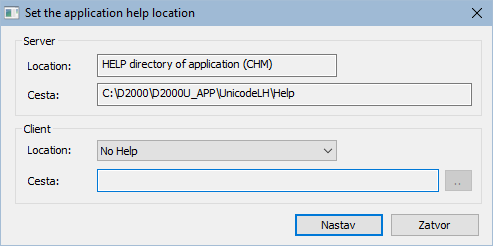
| Location | Meaning | Path - Set the location of the help |
|---|---|---|
| D2000 server setting | Setting according to the D2000 server | The location is taken from the settings on the server |
| Without help | No help. The application does not provide help | Not specified |
| HELP application directory (CHM) | It uses chm files as help. | The path points to the location referenced by the D2000 application and cannot be changed. E.g.: C:\D2000\D2000_V11.2.57\D2000_APP\Demo\HELP. |
| Web server (Confluence) | Help is available through any website created in Confluence | The path leads to an Internet address. It must be entered. The physical location is ultimately required to comply with Confluence rules |
| Web server (HTML) | Help is available through some websites. | The path leads to an Internet address. It must be entered. E.g.: https://MyPages/help The physical location is completed as follows: the help language is added to the path, e.g.: SK + keyword label Example of the final location: https://MyPages/help/SK/label/ |
| Shared directory (HTML) | Help directory located on a network drive common to multiple D2000 consoles that have access to it. | The path points to any location on the network drive. It must be entered. E.g.: S:\MY_HELP The physical location is completed as follows: the help language is added to the path, e.g.: SK + keyword label Example of final location: S:\MY_HELP\SK\label\ ... |
HELP application directory (HTML) | HELP application directory (HTML) | The path points to the location referenced by the D2000 application and cannot be changed. E.g.: C:\D2000\D2000_V11.2.57\D2000_APP\Demo\HELP. The physical location is completed as follows: the help language is added to the path, e.g.: SK + keyword label Example of final location: C:\D2000\D2000_V11.2.57\D2000_APP\Demo\HELP\SK\label\... |
| Local directory (HTML) | Help directory located on a local or network drive that can be accessed by the D2000 console. | The path points to any location on the local disk. It must be entered. E.g.: C:\MY_HELP. The physical location is completed as follows: the help language is added to the path, e.g.: SK + keyword label Example of final placement: C:\MY_HELP\SK\label\ ... |