For logging on, there will be used the same parameters as the parameters for the process D2000 HI (logged on user, password, server name). The feature will be enabled, if the workbook contains a cell named LOG_ON_FROM_HI and its value is TRUE. The cell exists in the template D2000_WorkBook.xlt and , by default, its value is FALSE. It is necessary to enable it (set the value TRUE).
According to the process (D2000 HI, MS Excel), where the report has been opened, its incorrect setting causes:
- in the process
D2000 HI, LOG_ON_FROM_HI = False (or doesn't exist)
The logon dialog is displayed (the report is functional after user's logon).
- in the MS Excel process, LOG_ON_FROM_HI = True
The functions D2_GetValue, D2_ArchValue get the value waiting for logon from HI.
Report parameters are being defined in the following dialog box in the process D2000 HI:
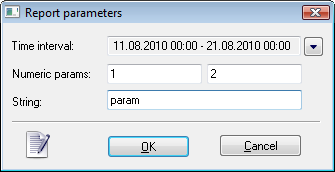
After defining the parameters and clicking the button OK defined values are to be transmitted to corresponding cells of the report.
| Parameter in the dialog box | Cell name |
|---|---|
| Time interval – begin time | D2000_BT |
| Time interval – end time | D2000_ET |
| First numeric parameter | D2000_NUM1 |
| First numeric parameter | D2000_NUM2 |
| String | D2000_TEXT |
