Controlling Pictures
The following popup menu that is used to control Pictures is displayed after
right-mouse clicking on a picture:
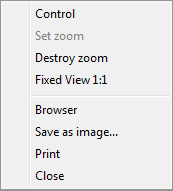
Note: If the picture is in zoom mode, set from script (by function %HI_SetModeCtrl), the menu will not
be opened.
| Control |
Control mode, work with the picture. |
| Set zoom |
Mode allows user to get a close-up view of the picture. |
| Destroy zoom |
Destroy the used zoom. |
| Fixed View 1:1 |
Display the picture in the enlarge ratio 1:1. |
| Browser |
Open objects used in the picture in
Browser. |
| Save as image... |
Save the picture as an image (.bmp file). |
| Print |
Print the picture. |
| Close |
Close the picture. |
 Control
The parameters controlling in the pictures are described in more detail here.
In the Control mode it is also possible to work with the picture view.
Setting a zoom in:
- Clicking on CTRL key+left mouse button on required position - double zoom.
- Select the location by clicking and holding down the left mouse
button and release.
Setting a zoom out:
- Clicking on CTRL key+right mouse button on required position -
zoom out as
previous zoom.
Setting a movement:
- In zoom mode, the picture view may be moved by clicking SHIFT key + left
mouse button.
- In zoom mode, the picture view may be moved by left mouse button if you
click outside the objects that are controlled by clicking them (see
parameter Control - Button down), or
windows controls.
However, the movement works if you click on the object that is controlled by
releasing mouse button (Button up). In that case, this action will not be
performed.
 Set zoom
Setting the zoom in the mode Set zoom is the same as in the Control
mode but the CTRL key need not be pressed.
Setting a zoom in:
- Clicking on CTRL key+left mouse button on required position - double zoom.
- Select the location by clicking and holding down the left mouse
button and release.
Setting a zoom out:
- Clicking on CTRL key+right mouse button on required position - half reduced zoom.
- If the zoom is set from script, press only right mouse button (CTRL key
is not required).
 Destroy zoom
After cancelling the zoom, the picture is automatically set into the Control mode.