A depository database is implemented as an independent database. Names of depository databases are defined by the configuration parameter PG_TrezorName0.
Similarly to Sybase, the configuration of the process D2000 Archiv contains a configured time period TrezorPeriod, during which the process writes data to one depository database. When this period elapses, the database is released, and the process starts storing values into a new database. The released database is available for storing delayed data for a given time (configuration parameter TrezorCompressTime). After expiration of this time, a default read-only access is configured for the database (ALTER DATABASE APLIKACIA_TREZOR_#ID# SET default_transaction_read_only = true) and then if the value of parameter TrezorCompressOffline=1, access to the depository database is forbidden (update pg_database set datallowconn = false where datname = 'APLIKACIA_TREZOR_#ID#'). After disconnecting a depository database, it is possible to run an external program - its name and path are defined by the parameter TrezorPostCompressCmd, and its parameters are defined by the parameter TrezorPostCompressPar.
This program can, for example, move and compress a disconnected depository database or create a dump of a read-only depository database via the PostgreSQL utility pg_dump.
Note 1: In order for a database user dba (used by D2000 Archiv to connect to PostgreSQL server), to create and disconnect the databases, it is recommended to grant the dba user a superuser privilege ( ALTER ROLE dba WITH SUPERUSER; ).
Note 2: As every depository database (resp. every depository database segment) is a separate database, which is accessed by the D2000 Archiv via a separate database connection, it is necessary to configure the PostgreSQL server to permit a sufficient number of connections (parameter max_connections), for D2000 Archiv to open a connection to all mounted depository databases.
Note 3: In order for the DBA user to be able to create dep;ository databases, it is necessary to give him superuser rights. This can be done from D2SMC from the archive context menu: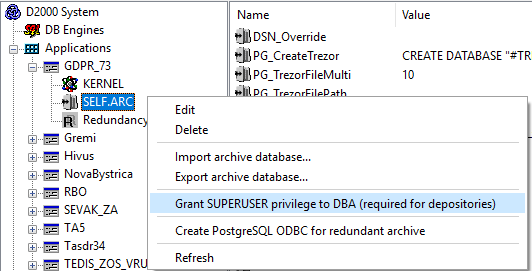
The depository database on the PostgreSQL platform also supports depository database segments (similarly to the Oracle platform). The depository database segment is a separate depository database, several of which can be created and filled in parallel. Each historical value is stored in one segment, the number of which is specified by the parameter Depository segment in the historical value configuration.
The number of segments created by the D2000 Archiv process is specified by the parameter TrezorCountSegments in the Windows registry. Historical values with the parameter depository segment higher than the value of the parameter TrezorCountSegments are to be stored in the zero depository segment (it is the segment that is also created when depository database segments are disabled).
The name of the database representing the depository segment 0 is specified by configuration parameter PG_TrezorName0, and the names of databases representing depository segments 1..N are specified by configuration parameter PG_TrezorName.
The main purpose of depository database segments is the creation of several smaller depository databases so that reading one historical value for a long time interval requires less disk space (because only specific segments containing that historical value need to be mounted) - compared to mounting all non-segmented depository databases for a required time interval.
PG_TrezorFileMulti - parameter is active if the PG_TrezorFilePath parameter is also specified. The parameter defines a multiplier for the CommitCount parameter. The default value of this parameter is 10.
PG_TrezorFilePath - parameter can be used for PostgreSQL 9.5 and above. It activates writing to depository databases via files, which is 2 to 3 times faster than the standard batch insert via the ODBC interface. After PG_TrezorFileMulti * CommitCount values are accumulated, they are stored in a file named archiv_<TrezorId>_<SegmentId>.txt (e.g. archiv_4_1.txt) in directory PG_TrezorFilePath and an UPSERT into a depository database is performed, using a foreign table mapped onto this file (using PostgreSQL extension file_fdw) as a source of data.
The directory PG_TrezorFilePath must be available both for reading and writing to the archive as well as to the PostgreSQL database; therefore, this parameter can be used if both the archive and database are on the same computer.
An example of a batch file used to perform a depository database maintenance and export, as well as the export of the trezors table located in the archive database MyApp.Archiv. The batch file requires as a parameter the name of the depository database, which can be provided by setting the TrezorPostCompressPar parameter to the value #TREZOR#.
rem Target directory for exports
set MyDir=D:\Trezors_export\
rem Set PGPASSWORD to password assigned to D2000 user
set PGPASSWORD=%D2000_DBPASS%
set PGUSER=%D2000_DBUSER%
rem Set PATH to PostgreSQL installation (version-dependent)
set PATH=%PATH%;c:\Program Files\PostgreSQL\13\bin
rem export of table trezors from the archive database
pg_dump -Fc -f "%MyDir%\MyApp_arc_trezors.dmp" --table \"trezors\" MyApp.Archiv >> %MyDir%\%1.log
rem permit write access to depository database and cluster the data table
echo alter database "%1" set default_transaction_read_only=false | psql -S MyApp.Archiv >> %MyDir%\%1.log
echo alter table data cluster on ix_data_rc | psql -S %1 >> %MyDir%\%1.log
echo cluster data | psql -S %1 >> %MyDir%\%1.log
rem set access to depository database back to read only
echo alter database "%1" set default_transaction_read_only=true | psql -S MyApp.Archiv >> %MyDir%\%1.log
pg_dump -Fc -f "%MyDir%\%1.dmp" %1 >> %MyDir%\%1.log
Example of an equivalent batch file for Linux:
#!/usr/bin/env bash
MyDir=/trezorbackup
MyArc=mes_tpd_archive_self
MyLog=$MyDir/$1.log

#path to pg_dump, psql etc
PATH=/usr/pgsql-11/bin:$PATH

#password for dba user
export PGPASSWORD=$D2000_DBPASS
export PGUSER=$D2000_DBUSER

#export of table trezors from the archive database
pg_dump -Fc -f "$MyDir/arc_trezors.dmp" --table \"trezors\" $MyArc >> $MyLog

#permit write access to depository database and cluster the data table
echo alter database \"$1\" set default_transaction_read_only=false | psql -S $MyArc >> $MyLog
echo alter table data cluster on ix_data_rc | psql -S "$1" >> $MyLog
echo cluster data | psql -S "$1" >> $MyLog

#set access to depository database back to read only
echo alter database \"$1\" set default_transaction_read_only=true | psql -S $MyArc >> $MyLog
#execute dump of depository database
pg_dump -Fc -f "$MyDir/$1.dmp" "$1" >> $MyLog