Supported device types and versions of devices
Communication line configuration
Communication station configuration
I/O tag configuration
Browsing of the OPC server address space
Historical Data Access
Tell commands
DCOM configuration for connecting a remote OPC server
Errors and problems
Literature
Changes and modifications
Document revisions
The protocol supports the client-side of communication with OPC (OLE for Process Control) DA (Data Access) servers according to the OPC DA specification ver. 2.05A and 3.0. It also supports the client-side of communication with OPC HDA (Historical Data Access) servers according to OPC HDA specifications ver. 1.20.
The following communication line parameters can be configured for protocol "OPC Data Access 2.05 & 3.0":
Tab. No. 1
| Name | Description | Unit | Default value |
|---|---|---|---|
| OPC HDA server name (ProgID), if it is available. Leave empty if OPC HDA functions are not to be used. | - | ||
| Sets the NumItems parameter for the synchronous reading of historical "raw" values. The implicit value 0 (zero) means all values in the given interval. | - | 0 |
| Authentication level used when establishing a connection to the OPC server. The OPC standard defines the following levels:
Note: The default value RPC_C_AUTHN_LEVEL_CONNECT (2) may no longer be sufficient. Microsoft has implemented security hardening to address the security issues described in CVE-2021-26414. See "KB5004442—Manage changes for Windows DCOM Server Security Feature Bypass (CVE-2021-26414)" for more details. | - | 2 |
| Starts the sequencing of calling the function Refresh2 of interfaces Async I/O 2.0 and Async I/O 3.0. The calling executes after the first calling has been finished (after it gets the values). | YES/NO | NO | |
| Failed OPC group activations will be attempted again after a delay specified by the parameter "Group reactivation delay". | YES/NO | YES | |
| A delay after which a failed OPC group activation is repeated if repetition is enabled by the parameter "Repeat failed group activation". | sec | 30 | |
| When an OPC group activation fails, KOM disconnects from the OPC server and reestablishes a connection. The parameter is relevant in a configuration of redundant OPC servers (after a disconnect from an OPC server, a reconnect to an alternate OPC server follows, where group activation may be successful). | YES/NO | NO | |
| Period of executing the call of GetGroupState of the interface IOPCGroupStateMgt. This synchronous call is repeated periodically to detect the problems that could occur in communication with the OPC Server. | sec | 10 | |
All the errors returned by calling the "GetGroupState" function of interface IOPCGroupStateMgt are considered to be fatal (they will result in a disconnect from the OPC server and in a reconnect, or in a restart of the KOM process). An example of an error message returned by "GetGroupState": | YES/NO | NO | |
| Allows stopping the KOM process when a fatal error occurs in communication. See the Note. | YES/NO | NO | |
| Only the active KOM process (i.e., the active instance connected to the HOT server) communicates with the OPC server. The KOM process, which becomes passive (by changing the active instance or switching the redundancy), closes the connection to the OPC server. Note: This parameter allows the reduction of the OPC server load in redundant D2000 systems, as well as solving problems with the license limitation on the number of OPC clients. | YES/NO | NO | |
| The parameter causes the first value of each I/O tag received after connecting to the OPC server to be ignored if it is invalid (it has a 'BAD' status). This parameter was implemented to suppress undesirable behavior of the OPC.SimaticNET server. | YES/NO | NO |
Note:
Fatal abort of communication with the OPC Server causes the COM/OPC errors at callings:
Communication protocol: OPC Data Access 2.05 & 3.0.
Station address requires:
The following station protocol parameters can be defined:
| Name | Description | Unit | Default value |
|---|---|---|---|
| Allows verifying the value after the recording by synchronous reading. | YES/NO | NO | |
| Allows writing data into the OPC Server only by the synchronous interface IOPCSyncIO2. | YES/NO | NO | |
| Using the Async I/O 3 option allows writing data by the WriteVQT function of the IOPCASyncIO3 interface (i.e., the write that transfers the quality and the timestamp together with the value). | YES/NO | NO | |
| Activates the debug list. It increases the amount of information about the communication operation. It is recommended to use it only for the detection of problems and debugging. | YES/NO | NO | |
| Special mode for communication with OPC Servers made by the Merz company. The conversion to/from MS DOS Date Time Format (2 x WORD) is used for values of TiA and ToA type. | YES/NO | NO | |
| A delay artificially inserted between the AddItems calls to slow down the initialization phase. | ss:mss | 0 | |
| An integer value of the "ERROR" state for conversion into Qi - quaternary input. | 0,1,2,3 | 3 | |
| An integer value of "OFF" state for conversion into Qi - quaternary input. | 0,1,2,3 | 2 | |
| An integer value of "ON" state for conversion into Qi - quaternary input. | 0,1,2,3 | 1 | |
| An integer value of "TRANS" state for conversion into Qi - quaternary input. | 0,1,2,3 | 0 | |
| If the quality of the OPC item changes to "BAD", the value of the I/O tag will be valid with a Weak flag. | YES/NO | NO | |
| Blocks repeated calls of AddItems, should adding a specific I/O tag address fail. | YES/NO | NO | |
| Activates all the items of a group by a single call. It can speed up the OPC communication start. | YES/NO | NO | |
| All calls of the Write and Refresh2 functions are registered as separate transactions. If they do not finish (successfully or unsuccessfully) within this timeout, the error message will occur in the trace file of communication. | sec | 120 | |
Timeout, which delays repetitions of failed operations:
| sec | 5 | |
| Enables synchronous reading of the item value before the writing if the KOM process does not know the item data type (i.e., if there is a default value of data type "Empty/Default (VT_EMPTY)" and if the value must be written). | YES/NO | YES | |
| Address of OPC Item (OPC Item ID), which contains the OPC server or OPC group error status (e.g., depending on the state of communication). An I/O tag with this address must also be configured. If the status reports an error, it will affect the values of all I/O tags on the station (they will have the Weak flag set). The Status Item Inverted Operation parameter specifies what value corresponds to the error status. | - | - | |
| Interpretation of the OPC Item Status Item Name with an error status of the OPC server or the OPC group. The NO value means that the False or 0 values mean the correct state, and True or non-zero values mean an error. The YES value means that the False or 0 values mean the error state, and True or non-zero values mean the correct state. | YES/NO | NO | |
| Mapping the "Non Specific " OPC DA quality flag into the attributes of the I/O tag value. | None, FA, FB, FC, FD, FE, FF, FG, FH, FI, FJ, FK, FL, FM, FN, FO, FP | None | |
| Mapping the "LocalOverride" OPC DA quality flag into the attributes of the I/O tag value. | |||
| Mapping the "Config Error" OPC DA quality flag into the attributes of the I/O tag value. | |||
| Mapping the "Not Connected" OPC DA quality flag into the attributes of the I/O tag value. | |||
| Mapping the "Device Failure" OPC DA quality flag into the attributes of the I/O tag value. | |||
| Mapping the "Sensor Failure" OPC DA quality flag into the attributes of the I/O tag value. | |||
| Mapping the "Last Known" OPC DA quality flag into the attributes of the I/O tag value. | |||
| Mapping the "Comm Failure" OPC DA quality flag into the attributes of the I/O tag value./td> | |||
| Mapping the "Out Of Service" OPC DA quality flag into the attributes of I/O tag value. | |||
| Mapping the "Waiting For Initial Data" OPC DA quality flag into the attributes of I/O tag value. | |||
| Mapping the "Last Usable" OPC DA quality flag into the attributes of the I/O tag value. | |||
| Mapping the "Sensor Cal" OPC DA quality flag into the attributes of the I/O tag value. | |||
| Mapping the "EGU Exceeded" OPC DA quality flag into the attributes of the I/O tag value. | |||
| Mapping the "Sub Normal" OPC DA quality flag into the attributes of the I/O tag value. | |||
| If a consecutive number of errors during reading equals the value of this parameter, reinitialization of the OPC connection will be performed. A value of zero means that reinitialization will not be performed (default behavior). The current implementation handles only errors in synchronous mode (type set to "Synchronous I/O" in the Address tab of the Station object). | - | 0 |
Possible I/O tag types: Ai, Ao, Ci, Co, Di, Qi, Dout, TiA, ToA, TiR, ToR, TxtI, TxtO.
I/O tag address requires defining the OPC Item ID (maximum string: 200 characters). If the OPC server supports the IOPCBrowseServerAddressSpace interface, the "OPC Item ID" address may be selected directly from the address list supported by the OPC server (by clicking the "Browse Items..." button, see the Browsing of OPC server address space section.
Note: if the I/O tag's address is specified as %IGNORE, such an I/O tag will be ignored.
Further required parameters (OPC Item Parameters) are:
The protocol supports the configuration of the Destination tab of the I/O tag. If the value of the OPC item is of Array type, the communication protocol copies the values of the array, starting with the ArrayIndex item, into a column of a structured variable. The size of the structured variable is taken into consideration. If the VARIANT array is smaller than the number of structured variable rows, the empty rows of the structured variable will be invalidated. If the number of structured variable rows is smaller than the VARIANT array, the values that are over the limit will be ignored.
Clicking on the "Browse Items..." button in the Address tab of the I/O tag dialog box opens another dialog window, "OPC Item Browser".
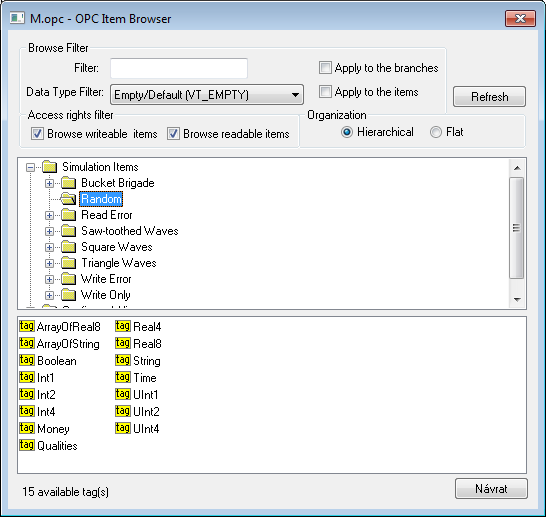
Here, the user can choose the items from the OPC server address space. The item representation can be "Hierarchical" or "Flat". Some of the OPC servers do not support the "Hierarchical" representation (the button "Hierarchical" is disabled). If both the representations are supported the "Hierarchical" may be switched over to "Flat" and vice-versa.
OPC Item ID may be selected by double-clicking on it. This item then occurs in the text field OPC Item ID in the Address tab of the I/O tag dialog box, and the "OPC Item Browser" dialog window will be closed. To close the window without change, click on the "Cancel" button.
On the top part of the dialog window, there are filter options. Text "Filter" allows showing only the items according to the mask (some of the OPC servers support the so-called star convention).
"Data Type Filter" allows showing the items of a specified data type. The "Empty/Default" option is the default and enables viewing all the items.
The user must define whether the filter should be applied on the hierarchical tree structure (check the "Apply to the branches" button) or also on the OPC items (check the "Apply to the items" button).
According to the access rights, only readable items are displayed (check the "Browse readable items" button) or writable ones (check the "Browse writeable items" button). Default settings - both possibilities are enabled.
The changed conditions come into effect by clicking the "Refresh" button.
Copying tags
A keyboard shortcut Ctrl+C copies the names of tags in a selected branch into the Windows clipboard. All tags will be copied unless a specific tag is selected.
A keyboard shortcut Ctrl+Shift+C copies the names of tags in all browsed branches into the Windows clipboard.
Note: In versions from 20th December 2018 and newer, recycling of browser dialog has been implemented. If the dialog is closed by the Close button or after selecting a tag, it is actually only hidden and it is available for browsing by another I/O tag within the same station, so that the tree structure of the browsed objects is preserved. Clicking on the close icon in the top right corner will cause the dialog to be closed.
Implementation of this protocol partially supports the specification of OPC HDA (Historical Data Access). The synchronous reading of raw data is supported. TELL command GETOLDVAL activates the reading of historical values. The asynchronous option IOPCAsyncIO of mode for OPC DA should be set to continuously read both the historical data and the current one.
| Command | Syntax | Meaning |
|---|---|---|
| STWATCH | STWATCH StationName | The command sends commands for the synchronous reading of values of all configured I/O tags (regardless of whether data access type is set to “Async I/O 2.0”, "Async I/O 3.0", or “Synchronous I/O”) |
| STCOMMAND | STCOMMAND StationName DISCONNECT | The command closes the active OPC connection of the line (the parent of "StationName"). Then, the system is restarted and the connection is reinitiated. If remote access is used and a backup OPC host is configured, the servers are interchanged ("OPC Host" for "Backup Host" or vice-versa). |
| STCOMMAND StationName CONNECT_PS | Closes the active OPC connection and enforces connection to the primary OPC server "OPC Host". It is important only for remote access. | |
| STCOMMAND StationName CONNECT_BS | Closes the active OPC connection and enforces connection to backup OPC server "Backup Host". It is important only for remote access. |
D2000 KOM Process (version 7.01.020 rel. 055 and higher) supports getting GUID OPC Servers from ProgID on remote computers through the DCOM interface by OPCENUM utility (remote browsing). The local registration of the OPC server on the local PC is not required if the OPCENUM utility/Windows service has been installed (both on the local PC with the D2000 KOM process as an OPC client and on the remote PC with the OPC server) and the access rights allow the remote browsing. The OPCENUM utility is a part of the "OPC Core Components Redistributable" package available on http://www.opcfoundation.org or as a part of the OPC Server installation package.
If this error occurs (see the section COM/OPC errors record):
ERROR: OPCServerName caused COM/OPC error 80040153H on CoCreateInstanceEx(IID_OpcServerList), Error string : Invalid value for registry
It is necessary to install the OPC Core Components Redistributable also on the OPC client (KOM process). The registration of the OPC Server is optional. To register, use one of the two ways:
Always study the OPC server manual from its manufacturer in detail and compare it with the procedures described above.
As the OPC DA standard uses COM/DCOM technology, the connection to the remote OPC server is checked for Windows operating system access rights. On both the local (OPC client) and remote (OPC Server) computer, the same user must be created (with the same password) and the user must be logged on the client computer, or the KOM process (running as a Windows service) must be started with this user's credentials.
Wrong setting of access rights will probably cause an error (see the section Errors and problems - COM/OPC error reports):
|E|> ERROR: ServerProgID caused COM/OPC error 80070005H on CoCreateInstanceEx(CLSCTX_REMOTE_SERVER), Error string : Access is denied.
Watch logs in the Event Viewer.
The problem can be partially solved when you add the Everyone group to Launch Permissions and Access Permissions. To ensure that the OPC server will be run under some user (not under the SYSTEM account), open the tab Identity and define the data for the option This user. In this case, the OPC server is not safe.
If the KOM process runs as a Windows service, it cannot use the "/X1" or "/X2" parameters, because it does not work under the logged-on user but under the SYSTEM account, and access rights verification executed by the OPC server fails. Use the "/X4" start-up parameter.
If it is not possible to start up the KOM process with the "/X4" parameter, check the user to be included in the "Log on as a service" Policy. Open the "Control Panel" -> "Administrative Tools" -> "Local Security Policy" -> "Local Policies" -> "User Rights Assignment" -> "Log on as a service".
For users working under Windows XP with Service Pack 2 or later operating systems, it is recommended to change the parameter Network access: Let Everyone permissions apply to anonymous users (Local Security Policy -> Local Policies -> Security Options) to the value of Enabled.
If errors like this occur:
|E|> ERROR: ServerName caused COM/OPC error 80070005H on Advise(IID_IOPCDataCallback), Error string : E_ACCESSDENIED Access is denied.
then it is necessary to add a user in the context of whose communication runs. In "Component Services" on the computer with OPC client (KOM process) add this user to the list of users on the "COM Security" tab -> "Edit Limits", for both "Access Permissions" and "Launch and Activation Permissions" parameters and enable "Remote Access" / "Remote Activation". It is a problem connected with establishing the callback connection with the OPC server. In this case, the roles are reversed, and the OPC client (i.e., KOM process) works as a DCOM server. Adding this user and enabling the remote access enables establishing the callback procedures between the OPC client and the OPC server. Call-back procedures are necessary for acquiring the values from the OPC server in the "Async I/O 2.0" and "Async I/O 3.0" asynchronous modes.
If the OPC server is configured to run under "The interactive user" on the Identity tab of the "Properties" dialog window, it may cause the OPC server to be available only when a user is logged on to the computer. We recommend changing this setting to "The launching user", "This user", respectively "The system account". |
In the specific case for the OPC communication to work, it was required:
|
When starting or during the course of communication, the following error reports could occur. For easier identification of the problem, set the communication tracking level at least to the level Monitor, or temporarily to the level Monitor & disk in the configuration dialog box of a particular communication line. If you select the level Monitor & disk, the file line_name.LOG containing all debug and error logs will be created in the subdirectory /TRACE of the application directory on the computer running the D2000 KOM process.
| Error: | WriteAsync - FAILED (transactionID) - Item : 'OPCItemID' |
| Description: | Attempt to write the value using the Write function call of the OPC interface IOPCAsyncIO2 failed. |
| Error: | ShutDown OPC Server : 'ServerProgID' ! |
| Description: | The OPC server was stopped, probably in the correct way, even though it has active clients. |
| Error: | OPC Server 'ServerProgID' is unavailable ! |
| Description: | The remote DCOM OPC server is unavailable. Process D2000 KOM as a client is still attempting to connect to the server. Check the PC with the installed OPC server (if it is running and is correctly connected to the local network). |
| Error: | SetCallBack - FAILED, Group : 'OPCGroupName', Server : 'ServerProgID' ! |
| Description: | Fatal error - call-back procedures of the OPC interface OPCDataCallback could not have been initialized for the OPC group. Contact Ipesoft's technical support. |
| Error: | SetGroupState - FAILED, Group : 'OPCGroupName', Server : 'ServerProgID' ! |
| Description: | Fatal error - SetStatefunction call of the OPC interface IOPCGroupStateMgt failed. Contact Ipesoft's technical support. |
| Error: | EnableSubscribe - FAILED, Group : 'OPCGroupName',Server : 'ServerProgID' ! |
| Description: | Fatal error - SetEnable function call of the OPC interface IOPCAsyncIO2 failed. Contact Ipesoft's technical support. |
| Error: | RefreshAllAsync - FAILED, Group : 'OPCGroupName', Server : 'ServerProgID' ! |
| Description: | Fatal error -Refresh2 function call of the OPC interface IOPCAsyncIO2 failed. Contact Ipesoft's technical support. |
| Error: | OPCConnectToServer - FAILED, Server : 'ServerProgID' ! |
| Description: | Fatal error - it is not possible to connect to the OPC server. Check the OPC server parameters - the tab OPC in the configuration dialog box of the communication line and the tab Address in the configuration dialog box of the communication stations. |
| Error: | OPCAddGroup - FAILED, Group : 'OPCGroupName', Server : 'ServerProgID' ! |
| Description: | Fatal error - the OPC group could not be created by calling the AddGroup function of the OPC interface IOPCServer. Contact Ipesoft's technical support. |
| Error: | ReadSync - FAILED, Item : 'OPCItemID' ! |
| Description: | Read call of the OPC interface IOPCSyncIO failed. |
| Error: | AddItems - FAILED (Group not connected), Item : 'OPCItemID' ! |
| Description: | The OPC item could not have been initialized, because creating the OPC group has failed. Contact Ipesoft's technical support. |
| Error: | Write - FAILED (transactionID) , Item : 'OPCItemID' ! |
| Description: | Writing the value into the OPC server failed. Writing is performed by the Write function called by the interfaces IOPCSyncIO or IOPCAsyncIO2, according to the parameter Type (data access type) of the OPC group. |
| Error: | Write - FAILED, OPC Server is disconnected, Item :'OPCItemID' ! |
| Description: | The value could not have been written into the OPC server, because the OPC server is disconnected. |
| Error: | Group parameters error, Group: 'OPCGroupName', Server : 'ServerProgID' ! |
| Description: | OPC group configuration parameters are wrong. Check the OPC parameters - the tab Address in the configuration dialog box of a particular communication station. |
The error reports described in the "Errors and problems" section are generated by a high level of the OPC client. Most of the errors will also contain an error report on the COM/OPC level. The format of such error reports is as follows:
WARNING/ERROR: ServerProgID caused COM/OPC error ErrorCodeHexadecimal on CallDescription, Error string : ErrorDescription
For example:
WARNING: Matrikon.OPC.Simulation.1 caused COM/OPC error 80010108H on IOPCGroupStateMgt::GetState(), Error string : The object invoked has disconnected from its clients.
ERROR: Matrikon.OPC.Simulation.1 caused COM/OPC error 800706BAH on IOPCSyncIO::Read(), Error string : The RPC server is unavailable.
The error reports are important for the problem analysis and will be required by Ipesoft's technical support if any problem occurs.
The documents are available on http://www.opcfoundation.org/.
Other sources: