Commands sent from the D2000 system console by the Runtime intercom subsystem can be used to diagnose and possibly change the settings of a running SGCom instance. To make the command line interface available, it is necessary to start the system console with the /ARTI command line parameter.
sysconsole.exe /ARTI
The interface is opened from the context menu of the given process
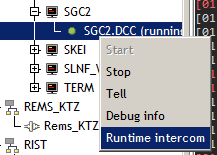
A command in the form JAPI::<instanceName>(HOBJ) must be selected in the interface.

The task to be performed by the selected SGCom instance is written into the command parameter. You will not be informed about the result of the command through the interface. The result is recorded only in the LOG.
SetLogLevel command - change the LOG detail level
Allows you to change the level of detail of logging messages into the LOG while the application is running, since they are loaded from the settings file only once at startup. The command has the form:
SETLOGLEVEL <subsystem> <level>
The following is an example command that sets the INFO level to the sk.ipesoft.sgcom.hdlc subsystem.
SETLOGLEVEL sk.ipesoft.sgcom.hdlc INFO
Show command – comprehensive configuration analysis
Allows you to get a clear listing of the selected part of the configuration. Currently, the listing of the configuration for a logical device by its ID is supported.
The command in the given example causes a listing for device 3.
SHOW CONFIG LD 3
Substituting ID for the keyword ALL will cause the configuration of all devices to be written to a file in the LOG directory. Example:
SHOW CONFIG LD ALL
The listing contains the configuration of the LogicalDevice entity as well as the corresponding PhysicalDevice and Connector and the hierarchically related DataPointSets and the DataPoints included in them, including their scheduled collections and transfers.
DUMP CONFIG command - complete dump of the contents of the configuration database to a file
Allows you to get a snapshot of the database content to a file in the LOG directory. Example:
DUMP CONFIG
IMMEDIATE READ ANY command - immediate reading of any value from the electricity meter
The command has the form IMMEDIATE READ ANY conversionType deviceId obis classId attributed
- conversionType = defines the conversion type of the read value. It can be one of:
- bool - logical value
- integer - integer value (also enum)
- real - floating point value
- text - text string
- raw - value without conversion - suitable for structured values
- CosemDateTime - textual interpretation of a value of type CosemDateTime
- deviceId - numerical ID of the logical device according to the configuration
- obis - OBIS code of the read COSEM object
- classID - numerical ID of the COSEM class of the read object
- attributeID - numerical ID of the COSEM attribute of the read object
Example: reading the unique identifier of a meter that is configured as a logical device with ID = 10.
IMMEDIATE READ ANY text 10 0.0.42.0.0.255 1 2
Example: reading columns in LoadProfile 1 (obis=1.0.99.1.0.255, classId = 7, attributeId = 3) from logical device 10
IMMEDIATE READ ANY raw 10 1.0.99.1.0.255 7 3
Example: reading the current state of the system clock (obis 0.0...0.0.255, classId = 8, attributeId = 2) from logical device 10
IMMEDIATE READ ANY CosemDateTime 10 0.0.1.0.0.255 8 2
IMMEDIATE READ PROFILE command - immediate reading from the profile
The command has the form IMMEDIATE READ PROFILE deviceId datapointId beginTime endTime
deviceId - numerical ID of the logical device according to the configuration
datapointId - numeric ID of the DataPoint entity that defines the object being read
beginTime - beginning of the read interval in UTC format yyyy-mm-ddThh:mi:ss.s1000Z (eg 2007-12-03T10:15:30.00Z)
endTime - the end of the read interval.
Note: which of the boundaries beginTime, endTime is part of the read interval, depends on the implementation of a particular electricity meter.
Example of reading from logical device 10, datapointId -148
IMMEDIATE READ PROFILE 31 -148 2018-08-25T00:00:00.000Z 2018-08-25T12:00:00.000Z
IMMEDIATE READ R1, R5, R6 command - reading of specific data via the IEC21 protocol
It is a set of universal reading commands for the IEC21 protocol.
The command has the format IMMEDIATE READ Rx deviceId requestText
Example of reading the P.01 profile header from logical device 31
IMMEDIATE READ R6 31 P.01(;;1)
IMMEDIATE READ READOUT command - reading of data listings via the IEC21 protocol
It is a universal read command for the IEC21 protocol, which reads the data listings of the electricity meter. These are used to access registry values and the Billing profile.
The command has the format IMMEDIATE READ READOUT deviceId
Example of reading from logical device 13
IMMEDIATE READ READOUT 13