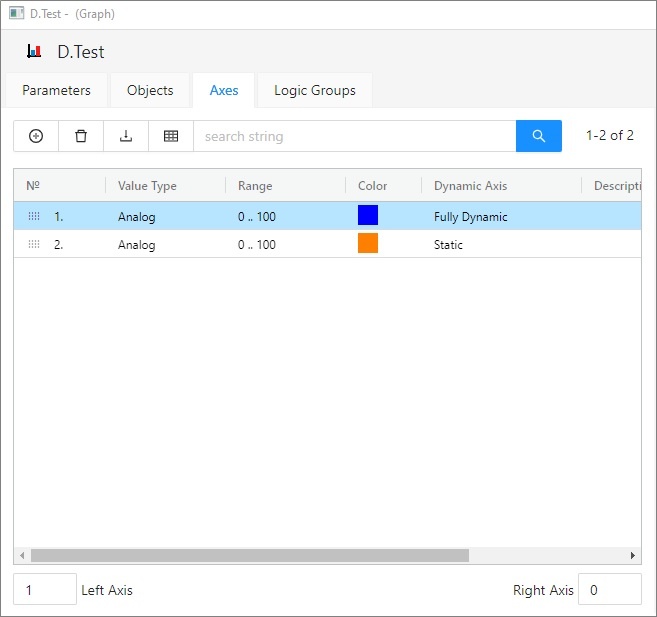
To configure axis settings use the graph configuration dialog box – the Axes tab.
You can define up to 99 different vertical axes (y-axes) for each graph. Two axes - left and right - may be displayed simultaneously in a graph window.
Also parameters of the x-axis for XY graphs are set in this configuration window. X-axis is always an analog type and some its elements are disabled.
Displaying of each axis may be enabled/disabled in the graph window according to the user's needs.
To add a new axis, use the button  . The button
  is used to delete selected axis.
Number of axis that to be displayed as left after opening the graph.
Number of axis that to be displayed as right after opening the graph.
List of axes defined for the graph. The list contains the following columns:
| Nr. | Axis serial number. The number is also in the header of Axis configuration dialog box. |
| Value type | Value type (the parameter Axis type in the dialog box Axis configuration). |
| Range |
|
| Color | Axis color (the parameter Axis color in the dialog box Axis configuration). |
| Dynamic axis | Dynamic axis type - for analog axis only (the parameter Dynamic axis in the dialog box Axis configuration). |
| Description | Axis description (the parameter Axis description in the dialog box Axis configuration). |
Hold and move the icon up/down to change the order of objects in the list. The order defined in the list will be adjusted in point configuration.