Picture information
Pressing the button CTRL+SHIFT and right-mouse button above a picture opens the information dialog box that displays basic information on the picture. The information is for D2000 system application developers.
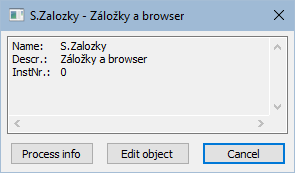
| Title | Picture window title (title may be defined by the function %HI_SetPictureTitle). |
| Name | Picture name. |
| Descr. | Picture description. |
| InstNr. | Instance number. |
| Process info | Special window containing informations about pictures and graphs. |
| Edit object | Edit object. Only when process Gr.Editor is running. |
| Cancel | Close window |
The subpicture of picture contains in addition to basic information also the information about parent picture.
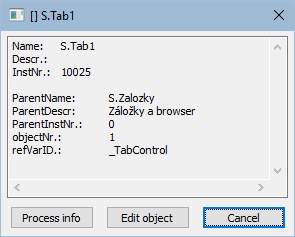
| ParentName | Name of parent picture, in which other picture is placed. |
| ParentDescr. | Description of parent picture, in which other picture is placed. |
| ParentInstNr. | Instance number of parent picture, in which other picture is placed. |
| ObjectNr. | Object number of parent picture, in which other picture is placed. |
| refVarID | Name of reference variable of graphic object from parent picture, in which other picture is placed. |
Note: After the information window with the information on picture is opened, the picture name is automatically inserted into the clipboard.
Related pages:
Pridať komentár