...
Access to the Configuration menu is possible in the Open/Composition, Graphs offer, or click the buttons 
 in the Main toolbar (of or press CTRL+Q, CTRL+T).
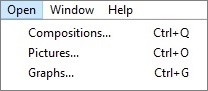
After selecting an item (Compositions or Graphs) from the menu, the following submenu appears:
...
The icons in the buttons depend on the type of action:
| Creates new object. |
| Changes the object parameters. |
| Deletes the object. |
| Classifies the objects into logic groups. |
| Confirmation of selection for opening the object. |
| Display/hide the filter/list for sorting objects in the left part of the dialog window. |
| Deletes the entered text in the filter. The button is active only if text is written in the filter. |


| Info | ||
|---|---|---|
| ||
Configuration of compositions |
G
M
T
Hlasová funkce je omezena na 200 znaků
...