...
SNMP protocol
Supported device types and versions
Communication line configuration
Communication station configuration
I/O tags configuration
Messages of Trap type receiving and processing
Browsing and reading the tree of values from the script
Literature
Changes and modifications
Document revisions
| Kotva | ||||
|---|---|---|---|---|
|
...
Protocol SNMP protocol (Simple Network Management Protocol) is used for monitoring and administration of network components. It allows the detection of the network devices' status and the changing of their settings. In an application, it is possible to monitor the functionality of e.g., routers, switches, computers, etc.
To create a station equipped with the SNMP protocol, it is necessary to have a UDP line (line of of TCP/IP-UDP type). It is worth mentioning here that a TCP/IP-UDP line line in the perception of the D2000 system is actually a UDP socket, which is a logical device to support communication of individual stations. It is not possible to use stations with a different protocol on a line where stations with the SNMP protocol exist!
| Kotva | ||||
|---|---|---|---|---|
|
...
- Communication line category: TCP/IP-UDP.
- UDP parameters:
- Host: There are three ways:
- The IP address of the particular network interface – datagrams will be transmitted and received only via this interface.
Example: 192.168.1.10 - The symbolic name of a particular network interface.
Example: D2SRV_PRIMARY - ANY or ALL -the configured UDP port is opened on all available network interfaces. An optimal network interface should be used for communication based on routing tables. The reception of messages will be performed on all network interfaces.
- The IP address of the particular network interface – datagrams will be transmitted and received only via this interface.
- Port: UDP port number (0 through 65535) from which the D2000 KOM process sends requests and receives the responses. If the value is 0, the port number is assigned automatically by the OS.
Note: Ports 161 and 162 are the standard UDP ports used in SNMP, but they are often reserved for SNMP agents - that is why it is recommended to choose different ports. Problems can occur with value 0 (zero) if the network uses firewalls and other security measures. Then, a specific port needs to be configured on the firewalls so that the packets from this port are passed via through the firewalls.
- Host: There are three ways:
Note:
If SNMP protocol needs to run in a redundant system, where two instances of the D2000 KOM process are running concurrently on two different computers and the IP address cannot be positively determined in the line configuration, it is appropriate to choose „ANY“ or „ALL“ configuration option or to name the network addresses identically as e.g. SNMP_LAN and assign them a correct IP address in the hosts file of each computer. See example:
...
| Keyword | Full name | Description | Unit | Default value | ||||||||||||||||||||||||
|---|---|---|---|---|---|---|---|---|---|---|---|---|---|---|---|---|---|---|---|---|---|---|---|---|---|---|---|---|
| Trace Level |
| - | 1 | ||||||||||||||||||||||||
| Trap Enable | Enables to receive the messages of the Trap type. | Boolean | False | ||||||||||||||||||||||||
| Trap IP Address | The IP address for receiving the Trap messages. | - | ANY | ||||||||||||||||||||||||
| Trap Port | UDP port for receiving the Trap messages. | - | 162 |
...
- Communication protocol: SNMP Manager.
- Station's address: it is defined in the format IP_address1[:port1], IP_address2[:port2].
IP_address may be set in decimal dotted notation (e.g. 192.168.0.1) or as a name (e.g. SrvMoxa1), which assumes address translation by means of DNS or a hosts file. Address1 and Address2 concern the existence of primary and backup lines/routes. Address 2 is usable, for example, for a server containing two network interface cards, which is connected to two different network segments available via two different network paths.
Port is a number in the range 1..65535 on which an SNMP agent expects communication to take place. As the default (if not statedconfigured, or set to 0) port, the standard port 161 will be used.
Note:
- If the line has only a primary IP address configured (numerical or symbolic), UDP packets are sent from this address to both IP addresses of the station. One numerical primary IP address of the line + two IP addresses of the station are valid for a network topology where the local network is non-redundant, but the remote network (where the station is located) is accessible via two redundant communication paths.
- If the line has both IP addresses configured, UDP packets to IP_address1 leave from the primary IP address of the line, and UDP packets to IP_address2 leave from the backup IP address of the line.
The situation when, e.g., IP_address1 is not configured conforms to the topology when the station is connected to a backup communication path only.
Protocol
The employed version of the SNMP protocol – one of the options can be selected:
- SNMP_V1 – the oldest version – does not support any secured access to the SNMP agent. It only distinguishes the objects that are freely accessible (public) and those belonging to a restricted group (private).
- SNMP_V2 – a version that supports authentication to access individual data types - an agent might (not) provide a particular set of data for an anonymous user (a manager,...) and different data for a user whose identity has been verified by entering a correct name and password.
- SNMP_V2C – the same as SNMP_V2 – the D2000 system does not distinguish these variants.
- SNMP_V3 – so far the latest protocol version – besides functions provided by SNMP_V2C, supports functions for authentication and encryption. It requires entering the name of an authentication server and authentication keys , to authenticate prior to communication with an agent, and keys for encrypting communication.
SNMP_V2, SNMP_V2C, and SNMP_V3 are not supported yet. Neither the writing into the SNMP agent nor reading MIB branches as a table (structured I/O tags or directly entered structure entries) are is supported.
Station protocol parameters
...
| Keyword | Full name | Description | Unit | Default value | ||||||||
|---|---|---|---|---|---|---|---|---|---|---|---|---|
| Wait Timeout | Timeout The timeout period for the response to the read request. | ms | |||||||||
| Retry Count | Number of re-sent A number of times, the read requests are resent before the read reading is considered to be unsuccessful, and another I/O tag will be queriedread. | - | |||||||||
| Max Error Count | Maximum count of unsuccessful read requests, until the station changes its value to the StCOMERR state. A successful value delivery nullifies all counters and puts the station back into StON state. | - | |||||||||
AR | Address Root | A prefix that will be added to the addresses of all I/O tags on the station. Using the prefix, it is possible to shorten the addresses written in the I/O tag configurations. | - | |||||||||
| Trace Level | The same meaning as parameter Trace Level on a line, but this setting is valid for the particular station. However, the higher value of a line parameter Trace level takes precedence. | Trace Level | The same meaning as parameter Trace Level on a line, but this setting is valid for the particular station. However, the higher value of a line parameter Trace level takes precedence. Note: Debugging of incoming packets is influenced by the line parameter Trace Level because, at the time of reception, it is still unknown which station the packet belongs to. | - |
...
Address1: Address of I/O tag. The address specifies the OID (Object identifier) of an object. It is displayed in a numerical format, e.g., 1.3.6.1.2.1.1.1.0. The address can also start with a dot, which is ignored, unless the Address is displayed in number format Root parameter is set (e.g., .: 1.3.6.1.2.1.1.1.0),
An I/O tag with such an address defined like that will all be read on a line, that is just operational (a primary or a backup line is determined according to the result of reply to previous request or possibly could be switched manually).via a network path, which is currently operational (a primary or a backup line is determined according to the result of a reply to a previous request, or possibly can be switched automatically).
If it would be necessary to have information on whether I/O tag with the address set by this way will be red always in active line (primary line, if this line is not available, then in case of need the backup line is automatic switched).
Information on availability of the primary or backup IP address of device can be found out using by so the device is available, it is possible to use the so-called forced addressing - just select by selecting the option Only Primary, respectively Only primary or Only secondary. Thus we This will ensure , that value acquisition of the I/O tag is required on that line only. The option Both is default one, when value will be acquired only from the primary, respectively, secondarystation address. The Both option is the standard option, where the values of the I/O tags are acquired obtained continuously on both linesfrom both addresses of the station (if they are configured). The Passive option Passive indicates, that this means that the value of the I/O tag is not read directly called, but its value is acquired obtained indirectly as a copy of a the value of another I/O tag with the same address, but in the state active mode, e.g., Only primary.
If I/O tag, with entered the object with a specified OID address , does not exitexist, the SNMP agent returns an error code with a different OID address (because the object with the required OID dos does not exist), and therefore, the communication will be denoted as unsuccessful. The I/O tag passes to the „Unknown value“ state. If it is necessary to indicate the line status by value change and not by the validity of the object's value, the object of DI type can be created, an integer value (e.g. UpTime) can be asked for and an automatic number to boolean conversion can be utilisedutilized, where 0 is converted to false and the others other values to True. The object properties can be then adjusted I/O tag can then be configured to use a substitute default value and to set the default to False. Then the object may acquire only the values True or False in dependence , depending on the object's availability in the SNMP agent.
The I/O tag with an address starting with %IGNORE will be ignored.
| Kotva | ||||
|---|---|---|---|---|
|
Request: The Default value Get causes the values will to be read by a Get SNMP request Get.
Some devices have problems to give value providing values by the Get, request if it the object is the an item of fieldan array. Then, you must configure the type of request GetNext, and the address should be the OID of the previous object (to find the address, use java application the Java application MIB Browser (http://tl1.ireasoning.com/mibbrowser.shtml) that reads the whole tree of values and detects the OID address of the previous object).
Time delay: Offers a possibility to set a delay period for particular I/O tags – , to optimize the network's load. This time is added to the current time after a successful call and next call reading of the I/O tag's value, and the next request will be processed as soon as the current time is greater than or equal to the time calculated in this way.
If the object's value is unknown, the object will be included in communication in the next call periodic request (according to the time parameters of the station), regardless of the delay time.
Parameter Time The time delay parameter does not influence the processing of TRAP messages if the TRAP has the same address than address of Ias the /O tag.
After receiving the value from the SNMP agent, the conversion will be done according to the real type of value in the SNMP protocol and the required type in the D2000 system. If it is not possible to carry out the conversion, the value will be in unknown state invalid, and a report about the wrong conversion will be logged into a trace file.
ASN1 value type: Specifies , the value type in the SNMP agent's response. It also determines applicable conversions. The value type can be detected in the MIB database (note: MIB database browser is not a part of the solution). One of the freely available browsers can be used, and the desired data format can be set based on the obtained information. It is recommended to use java application the MIB Browser Java application (http://tl1.ireasoning.com/mibbrowser.shtml).
...
| Integer | input value - expected as a signed integer number (up to 64bit 64-bit *) |
| Unsigned | input value - expected as an unsigned integer number (up to 64bit 64-bit *) |
| Float | input value - expected as a floating-point number (float, a longfloatlong float) |
| TextxtText | input value - text string |
| IP address | the input sequence of bytes interpreted as a sequence of numbers separated by a dot – the sequence is converted to text |
| Hex text | the input sequence of bytes is interpreted as a sequence of hexadecimal numbers separated by a colon – the sequence is converted to text |
The value types IP address and Hex text can be applied to an arbitrary input data type, which will be further handled with as a sequence of bytes. E.g., the input value of text type with value "test@ipesoft.sk" can be interpreted in the following ways:
Text: "test@ipesoft.sk"
IP address: „112.101.114.105.99.104.64.105.112.101.115.111.102.116.46.115.107“7“
Hex text: „70:65:72:69:63:56:40:69:70:65:73:6F:66:74:2E:73:6B“
These methods were introduced to support cooperation with IP and MAC addresses of network interfaces.
* System D2000 support D2000 system supports values of objects in the maximum range of 32 bits for signed integer types. Therefore, if the number is bigger, then the maximum value of the 32-bit range will be assigned to it. If the input object of the D2000 system is of Ai type, the system will attempt to convert it to Real.
...
The following table shows the supported conversions of value types:
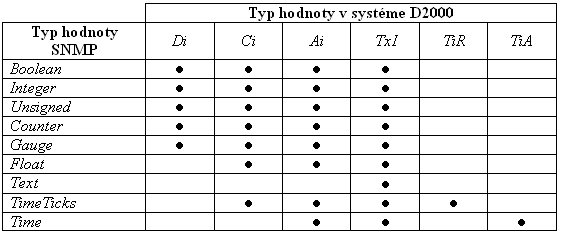
- admissible supported conversion
| Kotva | ||||
|---|---|---|---|---|
|
...
Protocol SNMP protocol also allows, except for cyclic value reading, to send messages about important events. This These messages are called Traps.
SNMP agent sends the Traps to the configured IP address and port (by default 162), which is configured (elementary simple devices support to send sending of Traps to one IP address and port, advance advanced ones send Traps to more addresses).
The parameter The Trap IP address parameter must by be configured to activate a task that receives the Traps on the port the Trap port.
Trap receiving is supported in the version versions V1 and V2C of the SNMP protocol SNMP. Default mode - . By default, one device send sends Traps to using one version of the protocol.
To receive Traps from a particular device, I/O tags with the following text addresses (must be configured on the station (however, there is no need to configure all of them) must be configured on the station:
Text addresses of I/O tags for Traps in the SNMP protocol, version V1:
| I/O tag address | Data type | Description | |||||||||||||||
|---|---|---|---|---|---|---|---|---|---|---|---|---|---|---|---|---|---|
| OID | OID of the object which generate that generates a Trap (for a particular device, it is constant). Note: A producer of a device can often be often detected from the OID. | |||||||||||||||
| Integer | Identifier of the Trap class. Following The following values are defined in RFC 1157 for SNMP, version 1:
| |||||||||||||||
| Integer | Specific code of the message. | |||||||||||||||
| TimeTicks | Time-stamp (according to RFC 1157, it means time (in the hundreds hundredth of a second) that passed between the last network reinitialization of the device and trap generating.the trap generation.
Kotva | trap_timestamp_pozn | trap_timestamp_pozn | Note: If I/O tag is Ai - Analog input, its value will be in seconds, i.e. TimeTicks/100.If I/O tag is Ci - Integer input, its value will be in hundreds of second, i.e. TimeTicks. The maximum value for integer value in D2000 is 2^31-1 (because the integer type is implemented as 32-bit integer with sign). I/O tag of Ci - Integer input type cannot acquire the higher values than 2^31-1. According to RFC 1157, the Time-stamp is of TimeTicks type which is a non-negative integer. It can acquire higher values than 2^31-1 which are not allowed to be written into I/O tag of Ci - Integer input type. That is why it is recommended to configure I/O tag of Ai - Analog input typeseconds, i.e., TimeTicks/100. If the I/O tag is Ci - Integer input, its value will be in hundredths of a second, i.e., in TimeTicks. | ||||||||||||
| OID | OID of the object that caused a formation the generation of the Trap or the object to which the Trap relate torelates. | |||||||||||||||
| Arbitrary | Value of the object that caused a formation the generation of the Trap or the object to which the Trap relate torelates. Note 1: Because the value is arbitrary, it is recommended to configure the I/O tag of of TxtI - Text input type. Otherwise, some values will not be converted (e.g., to Integer input), and the value of TRAP_VALUE will not be changed. | |||||||||||||||
| Boolean | I/O tag which confirm that confirms the values processing. Because several couples pairs of (TRAP_OID, TRAP_VALUE) can exist in one Trap message, the correct processing by e.g. an ESL script needs so that requires the KOM process will to set the next couple pair after the first previous one is processed. Also, the values of other input I/O tags for Trap messages should be set after signalization that the previous values have already been already processed. If the output I/O tag with address TRAP_CONFIRM exists, the KOM process will set the next couple pair of input I/O tag values after it is written into the ESL script writes to the output I/O tag with address TRAP_CONFIRM (the ESL script will execute perform the record writing as one of the its last operations). The values of another I/O tags (with addresses addresses TRAP_ENTERPRISE, TRAP_GENERIC_TRAP, TRAP_SPECIFIC_TRAP, TRAP_TIMESTAMP, and TRAP_OID) will be set if it is the processing of only when processing the first couple pair of values (TRAP_OID, TRAP_VALUE). In case of another couplesthe following pairs, the values of I/O tags will be the same, and they will only be changed during the next Trap message processing. If the output I/O tag with address TRAP_CONFIRM does not exist, the values of all input I/O tags with addresses TRAP_* will be set immediately after the Trap message occurred. The occurs. This way, the values can get be lost , because of the existence of the several value couples pairs in the Trap message or because of a new Trap message arrival, before the user script has processed the previous values. |
Text addresses of I/O tags for Traps in the SNMP protocol, version V2C:
| I/O tag address | Data type | Description | ||||||
|---|---|---|---|---|---|---|---|---|
| TRAP_REQUEST_ID | Integer | Increment The increasing Trap number of Trap. | ||||||
| TRAP_ERROR_STATUS | Integer | Error code. Default The default value is zero (0), but it can acquire one of the following values (see RFC 1448):
| ||||||
| TRAP_ERROR_INDEX | Integer | Extended error code (often it is 0). | ||||||
| TRAP_UPTIME_OID | OID | OID of object SysUpTime.0. This item should have the value 1.3.6.1.2.1.1.3.0 according to RFC 1448. ButHowever, if the item has not get this value in the it's not the case for a specific implementation, the value can be find found out by using an I/O tag with the address TRAP_UPTIME_OID. | ||||||
| TRAP_UPTIME_VALUE | TimeTicks | Value of object sysUpTime. The Note, mentioned in the description of address address TRAP_TIMESTAMP, is also valid for this value. | ||||||
| TRAP_TRAP_OID | OID | OID of object SnmpTrap.0. This item should have the value 1.3.6.1.6.3.1.1.4.1.0 according to RFC 1448 (i.e., OID of object snmpTrapOID, see RFC 1450). ButHowever, if the item has not get this value in the it's not the case for a specific implementation, the value can be find found out by using an I/O tag with the address TRAP_TRAP_OID. | ||||||
| OID | Identifier of Trap category, meaning of which corresponds to item TRAP_GENERIC_TRAP in SNMP, version V1, but it is of OID type that allows to define defining the error codes, specific for particular producers and devices. Meaning The meaning of the standard OIDOIDs, which can acquire the Trap category can obtain (according to RFC 1450), are followingis as follows:
| ||||||
| TRAP_OID | OID | The same meaning as TRAP_OID in SNMP, version V1. | ||||||
| TRAP_VALUE | arbitrary | The same meaning as TRAP_VALUE in SNMP, version V1. | ||||||
| TRAP_CONFIRM | Boolean | The same meaning as TRAP_CONFIRM in SNMP, version V1. |
...
Note 2: If the parameter Trap enable has been already configured on the line, the individual task will be activated because of Trap messages processing. This task will receive the messages on the chosen UDP port , number of which specifies specified by a link parameter, Trap port (default 162).
If the Trap message processing is configured on the line with address ANY or ALL and on the particular port, it is not possible to configure the Trap message processing on another line and use the same port. It causes a collision. But it It is, however, possible to configure another parameter, Trap port (e.g., 163), and set, on configure the devices , the sending of this to send Trap messages to another this port (e.g., 163).
Note 3: In a redundant system, user must take into consideration that SNMP agents usually support the sending traps to just one IP address (set in advance). Therefore, when redundancy is applied, everything will be ready for receiving traps on the side of D2000 system, but the monitored devices will send traps to the original address. A support of DDNS could be a solution, but only in case that the SNMP agent can use DNS DDNS services.
User must ensure so It is the user's responsibility to ensure that the lines will not use the same network interface on with the same UDP port. A line with IP address configuration as ANY basically causes blocking (restrictingreserving) the UDP port on all network interfaces, which may collide with another TCP-UDP line.
...
The version D2000 7.02.006 and higher supports the dynamic address change of the I/O tag by TELL the SETPTADDR command SETPTADDR. This address, together with the I/O tag address GETNEXT_OID allow to browse and read , allows browsing and reading the whole tree of values by SNMP request GetNext.
| I/O tag address | Value type | Description | ||||||
|---|---|---|---|---|---|---|---|---|
| TxtI - Text input | OID of next object, it is in the response on request GetNext. Only requests that have been generated as the a result of the address change of the I/O tag by tell the SETPTADDR command SETPTADDR are taken into consideration, and not the requests that have been generated as a result of cyclic reading of I/O tags. |
To read the tree of values, you should configure two input I/O tags of TxtI - Text input type. One of them has the special address GETNEXT_OID. Tell command SETPTADDR set , the address of the second I/O tag is set by the SETPTADDR command.
After the address is set, the KOM process will generate the request to read the I/O tag. If the request GetNext is in address (e.g. SETPTADDR M.MySnmpVariable 1.3.6.1.2.1.1 TYPE=3;RQ=1), the OID (sent with reply) will be recorded written into the I/O tag with address address GETNEXT_OID (e.g., 1.3.6.1.2.1.1.1.0). After that, the new tell command containing this address (e.g. SETPTADDR M.MySnmpVariable 1.3.6.1.2.1.1.1.0 TYPE=3;RQ=1) can be sent, and so on.
Example of ESL script that shows the browsing and reading the first 100 objects from the tree starting with address 1.3.6.1.2.1.1 and recording writing the OID addresses and values into the structure _objlist:
...