...
General properties
Groups
Parameters
Environment variables
| Kotva | ||||
|---|---|---|---|---|
|
...
| Kotva | ||||
|---|---|---|---|---|
|
...
| Kotva | ||||
|---|---|---|---|---|
|
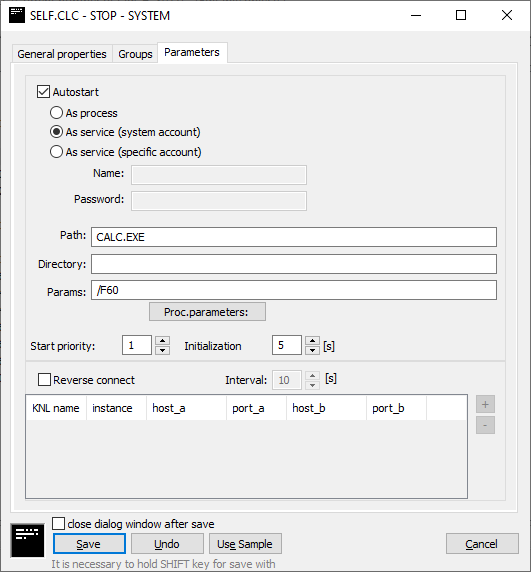
This is the automatic start of the process. If the option Autostart is checked, the D2000 Server starts automatically this the process during the system startup. If the process is terminated unexpectedly (i.e. crash), the D2000 Server will restart it.
...
- As process - D2000 process is started by D2000 kernel as an ordinary OS process
- As service (system account) - The D2000 process is started as a service using a system account (Local System)
- As service (specific account) - The D2000 process is started as a service using a specified account
Note: make sure that the specified user has the right to run the service ("Log on as a service") - the easiest way is to configure some service under it (eg an existing D2000 process).
Note: not only a local user (e.g. sysprof) but also a domain account (e.g. mydomain\sysprof) can be configured.
Path
Path to the executable file of process. If the process is located in the installation directory, you needn't enter the path. If is not located there, you have to enter the path.
Note: the path is relative to the directory where the D2000 Server is located (by default the bin or bin64 directory).
Example: if we want to run a 32-bit D2000 Kom process on a system with a 64-bit D2000 Server process, the path will be ../bin/kom.exe
Directory
Working directory of the process after its start.
...
Start parameters of the process. The list of parameters is opened after clicking the button Proc. parameters.
Start priority
Setting of the start priority of the process is important , when the D2000 Server automatically runs several processprocesses. Processes are to be started in the order: at first process with the highest priority, at last process with the lowest priority (higher number - higher priority).
...
In the reverse connect configuration, it is possible to specify several connects with different parameters - depending on which D2000 Server in redundancy creates the connect and to which process instance the connect is created (e.g., for instances of the D2000 Archiv process).
Note: the following combinations are possible in the process configuration:
| Autostart | Reverse connect | Use case |
|---|---|---|
| On | Off | By default for all local processes started by and connecting to the D2000 Server only (even in case of redundancy). |
| Off | Off | Remote processes that connect to the D2000 Server (or multiple redundant D2000 Servers). |
| Off | On | Remote processes to which the D2000 Server (or multiple redundant D2000 Servers) connects. Typically located in a less secure network (e.g., DMZ) |
| On | On | A locally running process to which the D2000 Server connects. This combination has no use yet. |
Period
The period with which the D2000 Server will attempt to establish a reverse connection.
KNL Name
If specified, it identifies the name of the kernel (D2000 Server) in the redundancy which that should create the reverse connection. If it is not specified, the reverse connection will be created by a a D2000 Server that is not part of the redundancy or is in the HOT state (active) in the redundancy.
...
TCP ports to which the D2000 Server connects. If both are specified, it is a redundant connection (DualTCP) and the D2000 Server connects to Host_A:Port_A and Host_B:Port_B.
Note: normally, these are the same TCP ports, different ports would be possible, e.g. in complicated network configurations with IP address and port translation.
| Kotva | ||||
|---|---|---|---|---|
|
...
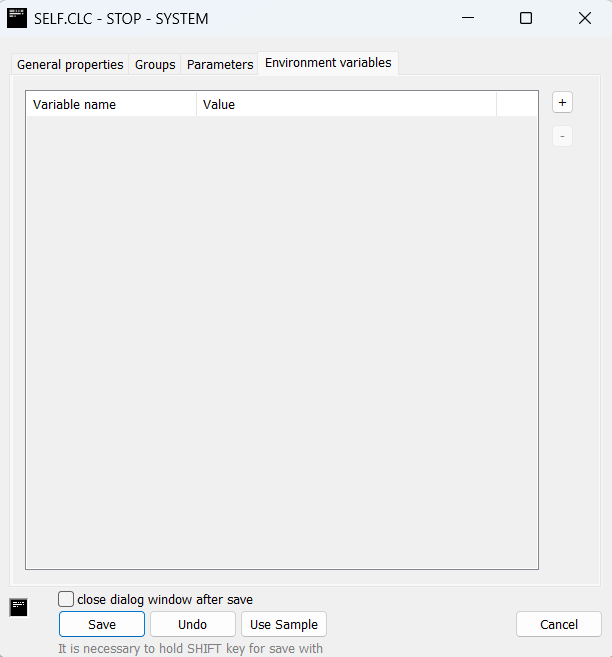
Environment variables are used when it is necessary to modify the values of existing variables or add new ones for a specific process.
These changes are local to the given process and do not affect the global settings of the operating system. Works only when option "As process" is selected out of options for starting process.
For every process, there are 3 predefined variables:
- D2000_INSTALLDIR -path to installation directory
- D2000_APPLDIR - path to application directory
- D2000_LOGDIR - path to log directory
Variable Name
The name of the environment variable to be set for the process.
The name may contain only letters (without diacritics), digits, and underscores (_).
Variable names are not case-sensitive.
Value
The value of the environment variable to be set for the process.
If this field is left empty, the variable will be unset (it will not be defined for the process).
| Info | ||
|---|---|---|
| ||
...