...
The answer to this question is very factory-specific. Here, here we offer two possible configurations:
Scenario 1 -
...
Three redundant D2000 systems
Currently, there are 3 independent (though interconnected) systems in <Our_company>, built using D2000 technology:
...
All three D2000 instances run physically on three independent execution servers (virtualized Windows), which run the hypervisor for the virtual servers needed to run the D2000 system. Each D2000 instance has its own application server, which is redundant and runs physically on a different server, and individual users connect to these application servers. New installations and updates for D2000 are distributed to users via FTP updates from a special server. D2000 is a fully redundant system in terms of application, archive databases, and network optical connections.
Scenario 2 -
...
A three-node SCADA and
...
a two-node MES
Currently, there are 2 independent (though interconnected) systems in <Our_company>, built using D2000 technology:
...
The SCADA application runs on 3 redundant physical servers (2 of them are in the primary location, the last one is in a disaster recovery location). The two servers are connected to 2 redundant networks, and the DR server is connected to a single network. . All servers run Linux (RedHat).
The MES application runs on 2 redundant virtual servers located in the primary location. These servers (Linux RedHat) also host a PostgreSQL application database, which also contains the EDA database (energy database working with vectors). This database is running on Linux clusterware (Corosync + Pacemaker).
Operators of the SCADA application are also connected to the redundant network, whereas users of MES are connected via redundant Security Access Proxy Servers running on virtual servers (Windows) located in a DMZ network.
...
There are 2 basic types of D2000 users. Administrators : administrators and standard users. Administrators can edit D2000 objects using D2000 CnfCNF/D2000 GrEditor tools. Selected administrators can also edit/create other users. This is how to obtain the list of users in the D2000 Cnf tool:
...
As for access roles, each user can be assigned to multiple Object groups for read/control/modify access. Each of the Object groups contains a list of D2000 objects to which these rights apply. For more info, see documentation - Users and Access Rights:.
These access rights are a configuration that is created by the D2000 administrator by creating an Object group, for example, Quality, and assigning this object to certain users for reading/controlling or modifying, and then the software determines who is logged in and the level of their access rights to the given Quality group. All/selected users can be exported to XML, and their assigned groups and access rights viewed/extracted. However, this can be a large amount of data, and knowledge of what the specific group means is needed.
...
Password policy is configurable using system parameters. Currently, Though single sign-on is supported by D2000 (on Windows/Linux), currently it is not configured; all authentication is performed by the D2000. Currently, parameter parameter SecurityPolicy=0, which means the advanced security policy (password length, number of numbers/special characters, etc) applicable during password change is not enforced. Also, password expiration is not configured for any user. We do not use a domain name for login.
...
For major implementation changes, the changes are created at the supplier and gradually deployed into production using the XML Export/XML Import utility. Of course, a backup of the system database is performed before deploying the changes.
Administrators can be filtered in the ‘D2000 list of users.xlsx’ file.
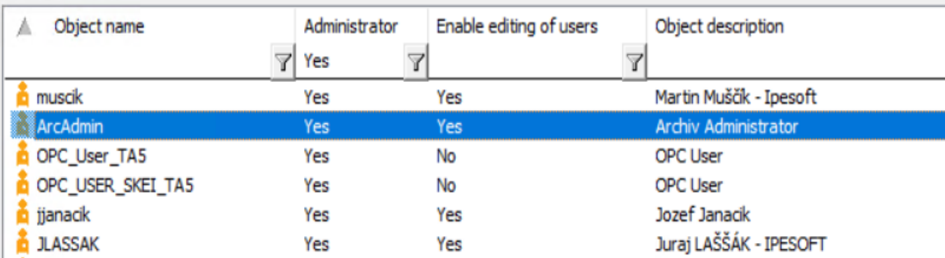
Please provide a system-generated listing of those individuals with the ability to modify (add, change, & delete) the job schedules for the D2000 system, including the supporting operating systems and databases.
There are no external “job schedules”. There are scripts (internal D2000 objects, containing ESL code and/or Java code) triggered by a system event or periodically; again, only administrators can edit them. See the previous answer.
Please provide a system-generated log showing the history (since 1/1/2025) of D2000 system automated jobs, including the date, time, job name, and success/failure status.
Please provide an electronic copy of the query utilized or a screenshot showing how the listing was generated:
There are no “jobs” defined in the D2000 scripts. Only internal scripts (ESL/Java) can be run (periodically or on a defined trigger). The scripts can use the LOG action to log a text message into a Logging database, but there is no logging of scripts being run. Only exceptions that occur in scripts (script errors) are recorded in the Logging database:
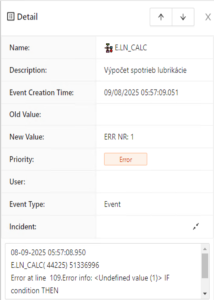
Please provide system-generated evidence (a report or a screenshot) showing the backup schedule of the D2000 system. Please provide documentation supporting if the backups are Immutable and/or Air-Gapped.
Scenario 1 - External backups by Windows Task Scheduler
Backups of Syscfg/Logfile databases are configured as Windows scheduled tasks on individual application servers. The configuration database and logging database (PostgreSQL) are backed up.
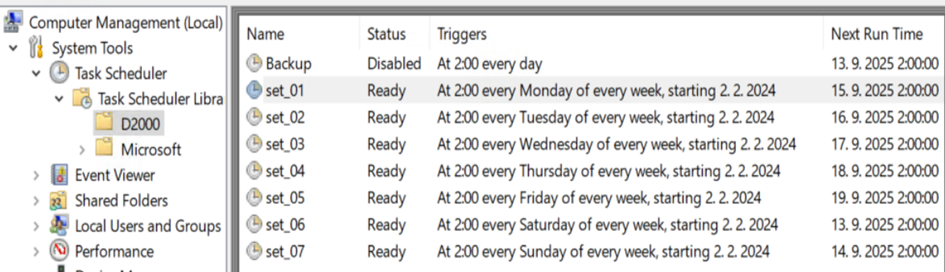
Backups of Syscfg/Logfile databases are created locally on application servers (D:\_Backups\_LastNight) and copied to \\ SrvBkp1v\_Backup\LastNight where the last 7 daily backups are preserved.
Backups of the MES database are configured as Windows scheduled tasks on the SrvDbs1v server. The MES database (Oracle application database) is backed up daily, using RMAN backup (to X:\Oracle\OraBack\MESDB) as well as the “exp” utility for export of individual schemes (to D:\_Backups\_LastNight). Exports are copied to \\SrvBkp1v\_Backup\LastNight\SRVDBS1 where the last backup is preserved.

Backups of archives (historical databases) of all applications are performed weekly on their respective servers.
Backups are created directly on \\SrvBkp1v\_Backup, not locally (due to their size).
Also, backup of virtual application servers, archiving server, and database server (SrvDbs1) are performed by Veeam (and kept on \\SrvBkp1v\_Backup).
We do air gap backups. We manually copy the data to a designated network storage location, where a job runs that transfers the data to a tape drive that is managed by local IT. We set the copy frequency to once a quarter. We have not yet tried to restore this data.
Scenario 2 - Backups performed by the Sysprof Backup module, 2-node redundant D2000 application
Backups of Syscfg/Logfile/Archive databases (from both redundant D2000 servers) are performed by the Sysprof Backup module. In the Sysprof schemes, backup parameters (start time, periodicity, timeout, and other parameters) are configured. Backups are performed on the management server where SYSPROF.EVH is running.
Daily backups are stored to D:\_Backup\_LastNight, and also copied to D:\_Backup\_LastNight_1, 2, ... 7, so the last 7 daily backups are available.
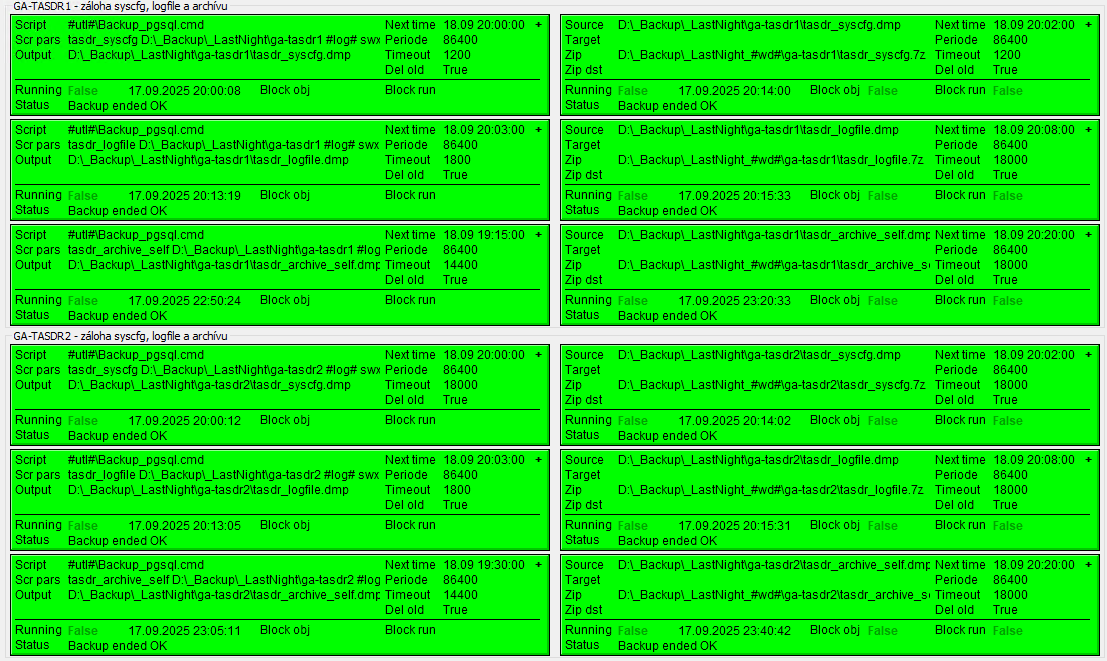
Scenario 3 - Backups performed by the Sysprof Backup module, an MES database on PostgreSQL
Backups of the MES database (PostgreSQL running on a Linux cluster) are performed daily by the Sysprof Backup module. They are stored to D:\_Backup\LastNight, and then copied to the NAS server, with a 7-day retention.
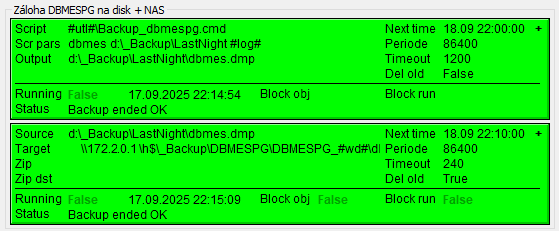
Scenario 4 - Backups performed by the Sysprof Backup module, an MES database on Oracle, using 'exp'
Backups of the MES database (Oracle RAC) are performed daily by the Sysprof Backup module. They are stored in D:\_Backup\LastNight, and then copied to the NAS server.
The Oracle "exp" utility is internally used to dump individual database schemes. The backups are then copied to the NAS server, with a 7-day retention (screenshot not included).
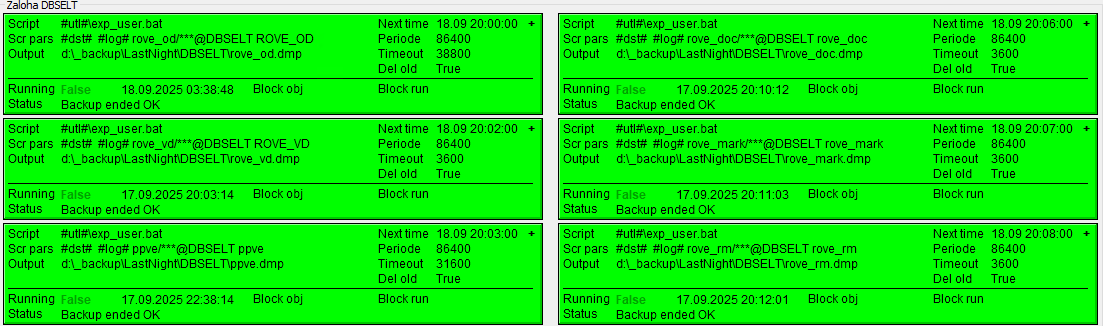
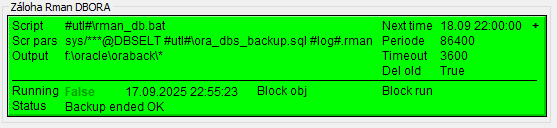
Scenario 5 - Backups performed by the Sysprof Backup module, an MES database on Oracle, using 'rman'
Backups of the MES database (Oracle RAC) are performed daily by the Sysprof Backup module. They are stored in F:\oracle\oraback, and then copied to the NAS server.
The Oracle "rman" utility is internally used to back up the whole database. The backups are then copied to the NAS server, with a 7-day retention (screenshot not included).
Please provide a system-generated listing of those individuals with the ability to modify (add, change, & delete) the backup schedules supporting the D2000 system.
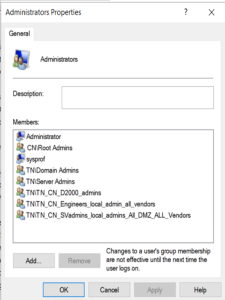
Scenario 1 - External backups by Windows Task Scheduler
That would be Windows users assigned to the Administrators group of individual servers (as well as Domain admins). E.g., on <D2000_server_name>:
Scenario 2 - Backups performed by the Sysprof Backup module
That would be D2000 users with Administrator rights. They can be filtered out from the list of all D2000 users for individual D2000 applications, see file ‘D2000 list of users.xlsx’.
Please provide a system-generated log showing the history (since 1/1/2025) of D2000 system backups, including the date, time, job name, and success/failure status.
Please provide an electronic copy of the query utilized or a screenshot showing how the listing was generated.
Scenario 1 - External backups by Windows Task Scheduler
As the jobs are run by Windows Scheduler, this question should probably be answered by the administrators of AD responsible for keeping logs. The scripts, however, also contain logging of being run, which can be looked at, and the required information manually extracted.
On application servers, logs are located in D:\_Backup\Logs\YYYY_MM directories (one log per backup).
Scenario 2 - Backups performed by the Sysprof Backup module
On application servers, logs of individual backups, performed by the Sysprof Backup module, are located in D:\_Backup\Logs\YYYY_MM directories (one log per run, plus one log per exp/rman/pg_dump).
Success/failure is reported by Sysprof, based on the return code of backup utilities used (e.g., exp/rman/pg_dump). Failure of the last backup is indicated by the red color of Sysprof Backup pictures (schemes).
Please provide documentation around a recent restore of the D2000 system.
So far, there has been no need to perform a full system or virtual server restore. We have tested restoring a virtual machine, and it worked fine.
Sometimes it happens that we revert to the last backup of the D2000 Configuration database. This restore is usually performed on a notebook where D2000 is installed, using D2000 Application Manager. Then, we use the restored database to XML export the configuration of objects that have been deleted or modified, and to revert changes.
Please provide a list of database users used for accessing D2000 databases (Configuration, Logging, Archiving) as well as to external databases (MES)
Configuration/Logging databases: Only the D2000 Server accesses these databases. Fixed username "dba" is used for access, password is configurable.
The Configuration database is read when the D2000 Server is started. The whole contents (with the exception of object history) is read into the D2000 Server's memory. After that, all configuration changes (including startup values) are written to the Configuration database. Reading is performed only when working with the Object modification history.
The Logging database is read whenever a user/script needs logging data. Both reading and writing are performed only by the D2000 Server. Writing is performed continuously, as events in the system occur.
So, whenever a user/script needs logging data, the D2000 Server reads it. Therefore, user PCs don't need network connectivity to the configuration database, only to the D2000 Server (TCP port 3119).
Archiving database: Only the D2000 Archiv process accesses these databases. Fixed username is used for access ("dba" for PostgreSQL and Sybase SQL Anywhere, <application>_archiv for Oracle), password is configurable.
Both reading and writing are performed only by the D2000 Archiv. Writing is performed continuously, as values of D2000 objects are being changed, and values can also be written by script (or manually by users from D2000 HI processes).
Again, user PCs don't need network connectivity to the archiving database, only to the D2000 Server (TCP port 3119), which routes the read/write requests to the respective D2000 Archiv process (there can be a single one or multiple instances in redundant systems).
External databases (e.g., MES): Connectivity to external databases is handled by the D2000 DbManager process. It uses DSN/username/password configured in the Database object. Non-administrators don't have access to the configuration of these objects, so they don't know these parameters.
Again, user PCs don't need network connectivity to the external databases, only to the D2000 Server (TCP port 3119), which routes the read/write requests to the respective D2000 DbManager process.
Note 1: Sometimes, however, users have, e.g., Microsoft Excel reports that directly read data from these databases; in these cases, network connectivity is required, but not because of the D2000 system, but because of these reports. Best practice is to use a dedicated, read-only user for these reports, who has strictly limited access rights for specific database tables only.
Note 2: Sometimes, external systems read/write data from/to these databases; in these cases, network connectivity is required from these systems. Best practice is to use a dedicated (if possible, read-only) user for these reports, who has strictly limited access rights for specific database tables only.
Please describe how the communication of D2000 clients with the D2000 Server is secured
Client processes (both user processes D2000 HI, D2000 CNF, D2000 GrEditor, and system processes e.g., D2000 Kom, D2000 Calc, D2000 DbManager) communicate with the D2000 Server using TCP, by default connecting to the TCP port 3119 (although also reverse connection of the D2000 Server to processes located, e.g., in low-level DMZ can be configured). On Windows, the local D2000 processes (running on the same computer as the D2000 Server) use shared memory, which is faster than TCP.
Scenario 1 - Default configuration
By default, proprietary compression and encryption are used in the communication channel.
Scenario 2 - TLS configuration
A standard TLS (version 1.3 in D2000 version 25) is used. Clients verify the validity of the D2000 Server's certificate. It is necessary to regenerate and redistribute the server certificate before it expires. More information on configuration and certificate generation can be read in the documentation.
Please describe which OS accounts and elevated privileges are used for the D2000 system
Scenario 1 - D2000 on Linux
On Linux, the D2000 runs under a user specified during installation. The default user is D2000. The D2000 application is started as a service using systemd. Most of the D2000 processes run with basic privileges; there are several exceptions, which are described in the documentation:
- D2000 Server process requires special capabilities to create multicast sockets:
setcap cap_net_raw=pe kernel - D2000 Kom process may require special capabilities to work with raw sockets, to bind to privileged ports, and to work with GPIO and serial ports (usage depends on used protocols):
setcap cap_dac_override,cap_sys_rawio,cap_net_bind_service+ep kom - D2000 Wssc process requires access to privileged port (port<1024):
setcap cap_net_bind_service+ep wssc
Scenario 2 - D2000 on Windows
On Linux, the D2000 runs as a service under a LOCAL SYSTEM user. Individual processes may, however, be run under specific users for multiple reasons:
- D2000 Event Handler: If the Sysprof module is deployed, to access other computers with D2000 (to monitor disk/CPU usage, free memory, etc). Also, if the process accesses remote file shares (e.g., to read/create TXT, XML, or CSV files), a dedicated user is needed, as network services are not available under a LOCAL SYSTEM user.
- D2000 Kom: If the OPC DA or OPC HDA protocols are used to connect to the remote OPC DA/HDA server, the same user with an identical password has to be configured on both computers.
- D2000 DbManager: If Kerberos authentication is used for some ODBC connections, this process may have to be run under a specific user.
In the configuration of individual processes, when Autostart is enabled, a specific Windows user can be configured (together with the password). In this case, the D2000 Server process creates a Windows service under this user and starts the service. The specified user has to have a "Log on as a service" right, so that a service can be started impersonating the specified user.