...
- There are two redundant application servers (physical or virtualized) - Windows or Linux.
- On both servers, D2000 Servers are running as a redundant application (Master/Standby).
- On both servers, Eclipse Mosquitto MQTT brokers are running, configured in TLS mode with a certificate signed by a certification authority. They are running without configuring message exchange between them, i.e., each of them is completely independent.
- D2000 Kom process has a configured TCP/IP-TCP Redundant line, with configured MQTT server broker certificate verification, and with configured certificates. D2000 KOM is therefore connected to to both MQTT servers brokers simultaneously.
- Other MQTT clients (PLC and other devices) are connected to at least one of the MQTT serversbrokers (i.e., they allow you to configure 2 IP addresses of MQTT servers brokers to which they try to establish a connection alternately).
- TLS certificates signed by a certification authority are used to verify the identity of all clients.
...
Configuration file mosquitto.conf
The example shows the Example for configuration on Windows; the paths on Linux OS need to be adjusted Linux Ubuntu (the broker.conf configuration file itself can be located, for example, is located in /etc/mosquitto/conf.d):
| Info | ||
|---|---|---|
| ||
#MQTTS listener on port 8883 |
...
/certs/broker.key |
The example for configuration on Windows:
| Info | ||
|---|---|---|
| ||
#MQTTS listener on port 8883 |
...
| Info | ||
|---|---|---|
| ||
#user without username: anonymous is forbidden, but just to make sure: deny everything |
...
The following procedure describes how to create keys and TLS certificates for the MQTT broker, the MQTT client myPLC (PLC or other device), and the MQTT client myD2000 (D2000 KOM process).
1.1 Creating a certification authority
This step can be skipped if you already have an existing certification authority, or if someone else signs your certificates. The -days parameter specifies the validity period of the certificate. The -keyout parameter defines the name of the private key file (which must be protected from theft), and the -out parameter defines the name of the certificate (which must be published).
...
When creating a key, you must enter a password to protect it.
1.2 Copying a Certification Authority Certificate
The certification authority certificate (caMQTT.crt) must be copied so that the D2000 KOM has access to it (the easiest way is to put it in the application directory) and set the path to it as the "Partner certificate" parameter (#APPDIR#\caMQTT.crt) in the TCP/IP-TCP Redundant line configuration.
The certification authority certificate (caMQTT.crt) must be copied to the MQTT broker so that the MQTT broker can use it to verify the validity of MQTT client certificates (directory /etc/mosquitto/ca_certificates).
Note: In the case of redundant MQTT brokers and redundant D2000 application servers (and other MQTT clients), it is necessary to copy the certification authority certificate to all relevant servers!
2.1 Key creation and certificate signing request for the MQTT broker
...
The broker.crt file (MQTT broker certificate) must be copied to the MQTT serverbroker, along with the broker.key file (MQTT broker private key) and the certification authority certificate (caMQTT.crt)to directory /etc/mosquitto/certs. It is also recommended to protect the the broker.key file (with access rights, encryption) so that only the user under whom the MQTT broker is running has access to it.
...
If you created a certification authority above, you are creating a certificate (signing a certificate signing request). Otherwise, you send the myPLC.csr file for signing to the appropriate certification authority (e.g., the company's IT department).
The -days parameter specifies the certificate validity period in days.
openssl x509 -req -inmyPLCin myPLC.csr -CA caMQTT.crt -CAkey caMQTT.key -CAcreateserial -out myPLC.crt -days 1000
The myPLC.crt file (MQTT client certificate) must be copied to the MQTT client, along with the myPLC.key file (MQTT client private key) and the certificate authority certificate (caMQTT. crt). It is also recommended to protect the myPLC.key file (with access rights, encryption) so that only the user under whom the MQTT client is running has access to it.
...
Just as the key for the myPLC MQTT client was created and signed, it is necessary to create and sign the key for the myD2000 MQTT client. Its public certificate (myD2000.crt) must again be copied to the MQTT broker directory. The public certificate (myD2000.crt) and private key (myD2000.key) must be copied so that D2000 KOM can access them (the easiest way is to the application directory) and set the path to them as the parameters "My certificate" (#APPDIR#\myD2000.crt) and "My key" (#APPDIR#\myD2000.key) in the TCP/IP-TCP Redundant configuration.
The configuration of a D2000 line of type TCP/IP-TCP Redundant will look like this:
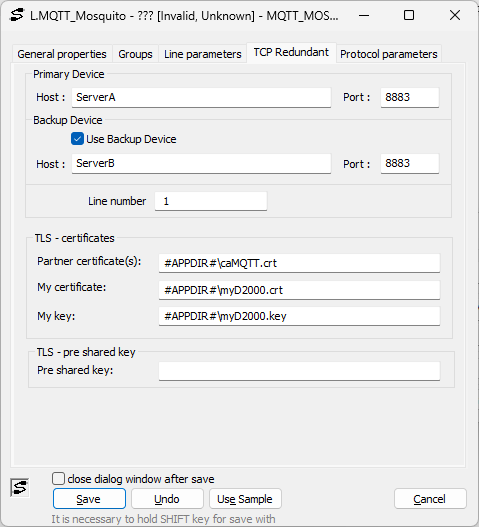
Note: It is recommended to protect the private key for the D2000 MQTT client (myD2000.key) with a password, which must be entered in the "Pre-shared key" field. For more information, see the TCP/IP-TCP Redundant line description.
| Info | ||
|---|---|---|
| ||
...