...
- communication via TCP
- explicit messages (request/response type of communication)
- standard addressing of objects (Class/Instance/Attribute)
- symbol addressing of objects (proprietary Rockwell implementation)
- optimization of symbol objects addressing - so-called Symbol Instance Addressing
- optimizing the reading of multiple values using Multiple Service Packet Service messages
- work with structures (UDT)
- work with unconnected messages
- work with connected messages using Forward Open / Large Forward Open messages
...
Note: The Micro820 firmware version 6 only partially supported work with symbol addresses. Reading and writing worked, but browsing didn't - there was no class Symbol Object [0x6b]. Firmware version 10.0.12 supported browsing.
Note: CompactLogix 5370 supported work supports working with symbol addresses, browsing, as well as optimization of work in symbolic mode using Symbol Instance ID.
...
Note: if all of the stations are in StOFF mode (or in simulation) on a TCP/IP-TCP line, the TCP connection will be closed. Thus, it is possible to control TCP communication from the event using an STSTAT tell command.
...
| Keyword | Full title | Description | Unit | Replacement value | ||||||
|---|---|---|---|---|---|---|---|---|---|---|
| Read Wait Timeout | Waiting between individual reads of data from the communication if no data has been received.. | sec.mss | 0.010 | ||||||
| Batch Size | The number of messages after sending of which, the Send Delay is performed. | - | 1...1000 | ||||||
| Send Delay | Waiting after sending a batch consisting of Batch Size message. The purpose is not to overload the device with too many messages. Note: while testing the Micro820 device, problems were encountered when sending approximately 200 messages (browsing instances of the class File Object [0x37] with zero delay. Waiting for 1 ms solved the problem. | sec.mss | 0.001 | ||||||
| Max Pending Requests | Maximum number of unacknowledged messages. If the number of unacknowledged messages reaches the value of the parameter, the KOM process waits before sending the next message. A value of 1 means that each message must be confirmed before sending another one (so that the PLC cannot be overloaded due to intensive communication). | 1..100 | |||||||
| Write Symbolic: Array Elements | Methods of writing an array using symbolic addressing (Rockwell). There are three supported modes:
| - | 0 .. Array Index | ||||||
| Optimized write of array element | Optimized write is used when only one array element is written. Optimization consists of writing only one specific element and specifying its index (in the protocol specified as Member ID). Note: the tested Micro820 device supported the optimization, the test software server did not. | - | False | ||||||
| Max Packet Size | The maximum size of Ethernet/IP messages (Unconnected Explicit message) - according to the standard 504 bytes. Note: in symbolic mode (Rockwell) it is also possible to work with larger arrays using proprietary services Read Tag Fragmented Service and Write Tag Fragmented Service. Note: this size does not include the Encapsulation Header (24 bytes - Command/Length/Session Handle/Status/Sender Context/Options) or the SendRRData/Common Packet Format header (16 bytes - Interface Handle/Timeout/Item1 + Length/Item2 Length). Note: values greater than 504 bytes are used only if the parameters Use Connected Transport and Large Forward Open have the value YES (Connected Explicit Messages are used and the CIP connection is established with the Large Forward Open message). Note: for a specific CompactLogix (1769-L24ER-QBFC1B/A LOGIX5324ER) the maximum value of the parameter was 4002. For larger values, the response to the Large Forward Open message contained an error code: Received Rockwell LargeForwardOpen Response [xDB] with GeneralStatus: Connection failure [x01], Additional status: <09><01><A2><0F> INVALID CONNECTION SIZE | Bytes | 504 | ||||||
| Response Timeout | Timeout to receive an answer for a request. If the response for a request is not received within this time, this is considered an error, and the TCP connection will be closed. | sec.mss | 10.000 | ||||||
| Optimized Work with Symbolic Names | Optimization of work in a symbolic mode (Rockwell) - so-called Symbol Instance Addressing. Instead of using symbolic names, a Symbol Instance ID is used for reading. The Symbolic name is converted to the Instance identifier by the same service which is used for browsing. Note: Not every device or Rockwell firmware version supports this optimization (tested Micro820 with firmware 10.0.12 or 11.0.11 did not support this optimization). In this case, if the device returns the Service not supported [0x08] error code, the optimization will be disabled until the KOM process is restarted or the configuration of the respective line is re-saved. | - | False | ||||||
| TCP No Delay | Setting the TCP No Delay parameter to YES causes the low-level socket option TCP_NODELAY to be set, thus turning off the default packet coalesce feature. | - | False |
Communication station configurationKotva komunikacna_stanica komunikacna_stanica
...
| Parameter | Meaning | Unit / size | Default value | ||||||||||||
|---|---|---|---|---|---|---|---|---|---|---|---|---|---|---|---|
| An octet string representing the parameter Route_Path (of padded EPATH type, that is, the number of octets in each segment must be even). If this parameter is specified, the protocol messages (Get_Attribute_Single, Set_Attribute_Single, Read Tag [Fragmented] Service, Write Tag [Fragmented] Service) will be wrapped in an Unconnected Send message that is used for routing. It was not necessary to set this parameter when communicating with Micro820, MicroLogix 1100, and CompactLogix devices. When communicating with ControlLogix via the ControlLogix EtherNet/IP bridge Module (1756-EN2TR/C), it was necessary to set the parameter to 01 00, which according to protocol documentation means Port 1 (which represents the backplane) and slot 0 (where the Central Processor was located). To communicate with the processor in slot 1, the parameter had to be set to 01 01, so the general syntax for accessing a slot XX would be 01 XX. A more complicated configuration consisting of 3 segments:
so the whole Route Path string is: 01 00 12 0C 31 37 32 2E 32 35 2E 35 38 2E 31 31 01 01 (in the syntax of Rockwell OPC server it is "1,[0,2,172.25.58.11, 1], 1") | octet string | |||||||||||||
| Setting the parameter to YES causes the protocol messages (Get_Attribute_Single, Set_Attribute_Single, messages Read Tag [Fragmented] Service, Write Tag [Fragmented] Service) to Service to be wrapped in a Multiple Service Packet Service message. This parameter is used for communication optimization (wrapping several messages into one), while the size of one message (Unconnected Explicit message) does not exceed the Max Packet Size value. | YES/NO | NO | ||||||||||||
--- Connected Transport Parameters --- | |||||||||||||||
| Optimized structure reading can be used to read the entire structure from the PLC at once instead of reading individual members. Each structure has a defined template in the PLC (UDT- user data template). Optimized reading requires finding the structure (a list of individual elements, their types, and offsets within the structure). In the configuration of I/O tags, it is necessary to create one I/O tag with the structure address (e.g. Struct1) with Reading mode = Active read (this I/O tag will still be invalid, but will be used to generate read requests) and the other I/O tags with the addresses of the structure members (e.g. Struct1.MyValA, Struct1.MyValB) with Reading mode = Passive read. Note: In the case of large structures containing substructures, it is up to the application programmer to configure either an I/O tag for reading the entire structure (e.g. Struct2) or multiple I/O tags for reading substructures (e.g. Struct2.SubA and Struct2.SubB) - and find out what is optimal in a specific case in terms of speed and PLC load. Note: Deleting the cache file from disk and saving the communication station will cause the list of structures and templates to be reloaded and the cache file to be recreated. This may take several tens of seconds, depending on the number of structures and UDTs. | YES/NO | NO | ||||||||||||
| When Optimized Structure Read was active, in specific cases, it happened that a large template definition was not received in its entirety, but the name of the last member was truncated (e.g., missing 2 characters and a terminating 0). This happened when the message definition did not fit into one packet, but was larger (e.g., it should have been 861 or 2225 bytes). Setting this parameter to 2 or 3 (and requesting the corresponding number of bytes more) solved the problem. Problematic device parameters:
| 0-23 | 0 | ||||||||||||
--- Connected Transport Parameters --- | |||||||||||||||
| The parameter enables the use of connected CIP transport. Instead of Unconnected Send, a connection is created The parameter enables the use of connected CIP transport. Instead of Unconnected Send, a connection is created (with a Forward Open/Large Forward Open message) and then messages are sent through the created connection. | YES/NO | NO | ||||||||||||
| Kotva | cc | cc | through the created connection. | YES/NO | NO | ||||||||||
| The number of parallel logical CIP connections. A larger number allows faster handling of messages, on the other hand, PLCs support a limited number of CIP connections. Only one message can be handled by one CIP connection at a time. | 1-16 | 4 | ||||||||||||
| The parameter specifies the ID of the first logical CIP connection. If CIP Connections>1, then the configured and subsequent IDs (e.g. 10, 11, 12) are used. IDs of logical CIP connections must be unique, i.e. if there are several stations (on one/multiple lines) that communicate with the same PLC using connected CIP transport (Use Connected Transport=YES), it is necessary to configure a non-repeating ID. | 0-65535 | 1 | CIP ConnectionsThe number of parallel logical CIP connections. A larger number allows faster handling of messages, on the other hand, PLCs support a limited number of CIP connections. Only one message can be handled by one CIP connection at a time. | 1-16 | 4 | |||||||||
| The Connection Path parameter of the Forward Open/Large Forward Open message. The default value means:
| octet string | 01 00 20 02 24 01 | ||||||||||||
| The Vendor ID parameter of the Forward Open/Large Forward Open message indicates the vendor ID (identification of the D2000 KOM process). | 0 - 65535 | 0x1234 | ||||||||||||
| The Tick Time parameter of the Forward Open/Large Forward Open message indicates the size of the time interval used to calculate the Forward Open message timeout. See the Timeout Ticks parameter. | ms | 128 | ||||||||||||
| The Timeout Ticks parameter specifies the number of time intervals (of size Tick Time) used to calculate the Forward Open/Large Forward Open message timeout. Timeout is calculated as Tick Time * Timeout Ticks. | - | 1-255 | ||||||||||||
| The O->T RPI parameter of the Forward Open/Large Forward Open message indicates the size of the Originator -> Target Requested Packet Interval in microseconds. | μs | 2000000 | ||||||||||||
| The T->O RPI parameter of the Forward Open/Large Forward Open message indicates the size of the Target -> Originator Requested Packet Interval in microseconds. | μs | 2000000 | ||||||||||||
| Parameter Connection Timeout Multiplier of Forward Open/Large Forward Open messages messages. Specifies the multiplier by which the O->T RPI and T->O RPI parameters are multiplied to determine the timeout of the CIP connection in the O->T or T->O direction. The default timeout is therefore 2 000 000 μs * 16 = 32 seconds. Note: the parameters Connection Timeout Multiplier, O->T RPI and T->O RPI must be adjusted if the period/reading values defined on the station is greater than the CIP timeout , because the CIP connection will may expire during inactivity. | x2 - x512 | x16 | ||||||||||||
| The parameter allows a Large Forward Open message to be used instead of a Forward Open message to create a connected CIP transport. In this, it is also possible to specify a larger size of the Connection Size parameter than 504 bytes, so that the messages can be larger. See the note on the Max Packet Size parameter which specifies the Connection Size for Forward Open/Large Forward Open. | YES/NO | NO | ||||||||||||
--- PCCC Parameters --- | |||||||||||||||
| Setting the parameter to a non-zero value causes the use of the PCCC protocol encapsulated in the Ethernet/IP protocol. In this way, it is possible to communicate with older SLC 5/05 and PLC5E. At the same time, the symbolic address of the I/O tag starts to be interpreted as an address in SLC-500 format - see Allen-Bradley CSP/PCCC protocol (e.g. N:3 or $T4:0/ACC). | 0-240 bytes | 0 | ||||||||||||
| Selection of PCCC commands used for communication with older SLC 5/05 and PLC5E if the PCCC Max Data Length parameter is set to a non-zero value. The following options are available for selection:
* - when using these commands, only writing is supported for the file types Status (S), Binary (B), Integer (N), Float (F), and even for these types only writing of whole elements is supported, not bits. Writing is not supported for the Timer (T) and Counter (C) file types. | - | |||||||||||||
...
Symbolic name - a symbolic name. It can be simple (Test) or contain the address of a specific item of a one-dimensional array (Test [3]), multidimensional (Test [1] [2]), item member of a structure (Test.MyItem1), or item of an array of structures (Test[2].MyItem1).Kotva symbolic_name symbolic_name
If the PCCC Max Data Length parameter is set to a non-zero value, the symbolic address of the I/O tag starts to be interpreted as an address in SLC-500 format - see Allen-Bradley CSP/PCCC protocol (e.g. N:3 or $T4:0/ACC). Other settings (Fragmented read) are unused. Item count setting and reading items into the structure structured variable are supported (except for Input and Output file types). Writing values is also supported, and it is not necessary to set the Attribute type (and if it is set, it is ignored).
Note: The symbolic name is not case sensitive.
Item count - number of elements in the case of an array of values, the number of elements being read.This number may be less than or equal to the actual size of the array in the device.If it is not specified, one element is read.Kotva item_count item_count
Fragmented read - an indicationthat the Read Tag Fragmented Service message should be used for reading because the entire array does not fit into a message with the length specified by the Max Packet Size parameter.
Note: If the reading using the Read Tag Service message returns an error code Partial Transfer [0x06], the next reads will use the Read Tag Fragmented Service message as if the Fragmented read indication was set.
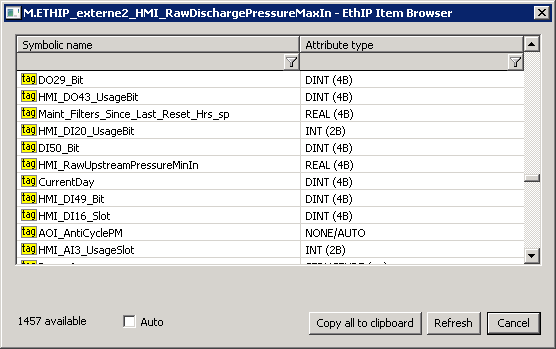
By clicking the Browse button, a browse dialog can be opened, and a list of symbolic names can be retrieved as long as the communication with the device is established. For each Each symbolic name, its 's type is also read. In the case of structures or arrays of structures, the type is identified as "STRUCTURE (---)". D2000 cannot presently use such complex types - it is necessary to specify an address of a particular item as a symbolic name (e.g. MyStruct.MyItem or MyArr [1] .MyItem)can work with structures if Optimize Structure Read parameter is enabled.
The Auto option is used to set the NONE/AUTO attribute type (autodetect). If this option is off, the attribute type is copied to the I/O tag along with the symbolic name after double-clicking on a specific line in the list of symbolic names.
The Refresh button is used to repeatedly retrieve the list from the device. The KOM process caches a list of symbolic names, so the second and subsequent opening of the browse dialog is significantly faster than the first one during which the data is being read from the device.
Note: symbolic names beginning with the underscore are related to system objects of the Rockwell device, other names are user-defined.Kotva
are user-defined.
| Kotva | ||||
|---|---|---|---|---|
|
Note: If the Optimize Structure Read parameter is enabled, browsing also displays individual elements of structured variables. If you want to read Rockwell STRINGs (which are essentially structures with DINT and SINT ARRAY members, see the following screenshot), you can select the appropriate STRUCTURE type member in the browsing dialog (in the screenshot, AlarmRspMsg.Path).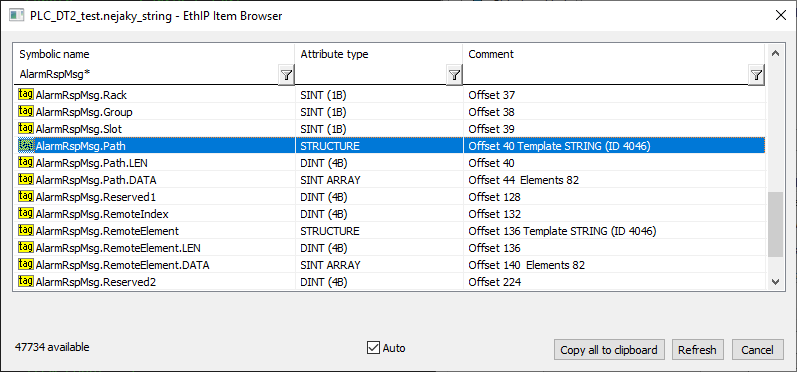
Atribute type - the type of attribute. In the case of standard addressing, it is necessary to enter a specific type. In the case of symbolic addressing, it is possible to leave the type of the attribute as NONE/AUTO (autodetect), since proprietary Rockwell messages contain both the value and the attribute type. An exception is if the I/O tag is write-only - then the attribute type must be specified.
Note: not all types of attributes from the offered list have reading/writing implemented. All numeric types, time types, strings (SHORT_STRING, STRING, STRING2), and numeric and time array types are supported. International string (STRINGI) type is supported for reading.
Array index - index of an element in an array, if the attribute is an array. In the Ethernet/IP protocol, an array is indexed from zero, so if the Item count is equal to 3, indices 0, 1, and 2 are allowed.
All numeric types, time types, strings (SHORT_STRING, STRING, STRING2), and numeric and time array types are supported. The international string (STRINGI) type is supported for reading.
Array index - index of an element in an array, if the attribute is an array. In the Ethernet/IP protocol, an array is indexed from zero, so if the Item count is equal to 3, indices 0, 1, and 2 are allowed.
Note: if Array index + 1> Item count, then Array index + 1 element will be read instead of Item count.
Note: instead of using an index, it is possible to specify the index directly as part of the symbolic name, e.g. "Arr[3]" or "Arr[5]". Then such I/O tags will be read separately. However, if an Array index is configured, the I/O tags will be read together (the Arr object and the number of elements 6 will be read, i.e. indices 0 to 5). Thus, it makes sense to use an Array index if we want to read several elements from the beginning of the array and write the index as part of the symbolic name if we read a single element with a high index (e.g. "Arr[100]")Note: if Array index + 1> Item count, then Array index + 1 element will be read instead of Item count.
Bit (1..n) - if an attribute type is an integer (unsigned/signed) number (BOOL, SINT, INT, DINT, LINT, USINT, UINT, UDINT, ULINT, DATE, TIME_OF_DAY, BYTE, WORD, DWORD, LWORD, ENGUNIT, and arrays of these types) it is possible to enter a specific bit (1 to 64, depending on the number of bits for a specific type).
...
- Active read - the I/O tag generates read requests.
- Passive read - the I/O tag does not generate read requests, but it processes values read by another I/O tag with the same Class/Instance/Attribute address or Symbolic name. This mode makes sense makes sense for reading arrays, where a single I/O tag can be active, and the other I/O tags are passive, so values of all (or selected) array items or structure members are read with one request.
Note: the Ethernet/IP protocol supports the reading of arrays into the structure (Destination tab), so it is possible to read the entire array into the column of a structure using a single I/O tag. - Write only - the I/O tag is intended only for writing.
...
| Info | ||
|---|---|---|
| ||
You can read blogs about the Ethernet/IP protocol: |
| Kotva | ||||
|---|---|---|---|---|
|
...
- Ver. 1.0 - November 28, 2018 - Creating of the document.
- Ver. 1.1 - January 2, 2019 - Improved browsing, and testing with 1769 with 1769 CompactLogix 5370 Controller
- Ver. 1.2 - September 6, 2021 - Support for encapsulated PCCC mode (read-only)
- Ver. 1.3 - December 21, 2021 - Support for reading items into the structure for PCCC mode
- Ver. 1.4 - January 4, 2021 - Support for writing in encapsulated PCCC mode
- Ver. 1.5 - May 30, 2023 - Support for Multiple Service Packet Service
- Ver. 1.6 - June 4, 2024 - Support for Connected Messages, Forward Open, Large Forward Open
- Ver. 1.7 - March 14, 2026 - Support for structures and templates (UDT)
| Info | ||
|---|---|---|
| ||
...