...
If necessary, it is possible to change the default password ("swx") of the user "dba" in the Sybase platform user for PostgreSQL and Sybase databases (configuration and log database). You can change the password only when the application is stopped., log, and archiving databases).
For PostgreSQL database:
- The password can be changed directly using kernel.exe (while the application is running).
- The same "dba" user is used for all databases in a particular PostgreSQL cluster (installation), so changing the password will also affect the D2000 Archive process.
For Sybase SQL Anywhere database:
- The password can be changed from the D2SMC
...
- only when the application is stopped.
- Each database (configuration, logging, and archive database) has its own "dba" user, therefore when changing the password in D2SMC, the passwords of the users in both the configuration and log databases are changed.
In the case of a redundant application, the password change must be performed on all application servers. Subsequently, it is necessary (for PostgreSQL) to restart the archive processes if their databases are located in the same PostgreSQL cluster (installation) as the configuration and log database.
...
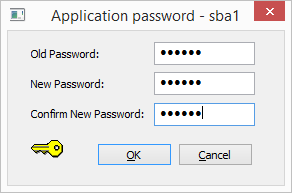
In D2000 System Management Console the password is changed in the dialog box that opens from the application context menu → Password
| Kotva | ||||
|---|---|---|---|---|
|
Changing the password using the kernel.exe program, which must be started from the command line (the user must have administrator rights).
...
Application ApplicationName must be properly configured.
Example of logs (PostgreSQL)
%D2KNL-I-Application Name: a1 |
| Kotva | ||||
|---|---|---|---|---|
|
In D2000 System Management Console the password is changed in the dialog box that opens from the application context menu → Password
Example of logs (Sybase SQL Anywhere)
An example of a log is statements when the password of for the configuration and log database was changed successfully.
...
| %D2KNL-I-Application Name: a1 %D2KNL-I-Process was started to change database password and set the password as permanent. %D2KNL-I-Opening syscfg.db .... %D2KNL-I-syscfg.db successfully opened %D2KNL-I-Opening logfile.db .... %D2KNL-I-logfile.db successfully opened %D2KNL-I-Password was changed in syscfg.db. %D2KNL-I-Setting password as permanent. %D2KNL-I-Password was successfully set %D2KNL-I-Password was changed in logfile.db. |
...
The password change in the configuration database will be performed even if the log database could not cannot be opened , unless the opening of the log database failed fails due to an incorrect password. This condition can occur if a configuration and log database with different passwords is used in one application.
...
| %D2KNL-I-Application Name: a1 %D2KNL-I-Process was started to change the database password and make the password as permanent. %D2KNL-I-Opening syscfg.db .... %D2KNL-I-syscfg.db successfully opened %D2KNL-I-Opening logfile.db .... %D2KNL-E-Database error when opening. %D2KNL-I-Password was changed in syscfg.db. %D2KNL-I-Setting password as permanent. %D2KNL-I-Password was successfully set. |
...
| %D2KNL-I-Application Name: a1 %D2KNL-I-Process was started to change the database password and make the password as permanent. %D2KNL-I-Opening syscfg.db .... %D2KNL-I-syscfg.db successfully opened %D2KNL-I-Opening logfile.db .... %D2KNL-E-Invalid password. Trying to use swx as password. %D2KNL-E-Invalid password. %D2KNL-I-No changes were made. |
...
For a redundant application, all participating applications must have the same password set. After setting a password (different from "swx"), the running of the application is conditioned by the presence of the same HW key that was present when the password was changed. If the HW key is replaced (or removed), the application will not start.
The user is informed about this condition in KLN-SELF.LOG by the message:
...
In this case, the password must be reinitialized.
This process can be performed from the D2MC or directly using the kernel.exe program, which will be started from the command line (the user must have administrator rights).
kernel.exe /CApplicationName /APpwdApplication ApplicationName must be properly configured.
Example of statements when the password of the configuration and log database was initialized successfully.
...
...
If a predefined Sybase SQL Anywhere configuration or monitoring database (from the Templates directory) is used in an application that has a password set, it is also necessary to initialize the password:
...
| %D2KNL-I-Application Name: a1 %D2KNL-I-Process was started to set the password as permanent. %D2KNL-I-Checking password %D2KNL-I-Opening syscfg.db .... %D2KNL-I-I changed the syscfg.db default password. %D2KNL-I-syscfg.db successfully opened -> close %D2KNL-I-Opening logfile.db .... %D2KNL-I-I changed the logfile.db default password. %D2KNL-I-logfile.db successfully opened -> close %D2KNL-I-Setting password as permanent. %D2KNL-I-Password was successfully set. |
...