In the D2000 Systemsystem, since version V10.0.38 PostgreSQL enables to operate , these databases can be run on PostgreSQL:
- configuration
- log
- archive
- depository
- application
The log depository databases are not supported for PostgreSQL. The new databases, except with the exception of the application ones databases (see the section Application databases in D2000 System), are created in D2000 Management Console Application Manager when creating the application or archive. This program also enables to create and manage the the creation and management of database services.
For the common users, the creation and management of databases on PostgreSQL is hide hidden and the only requirement is to have this system database installed. In certain situations (creating the application or archive), the user must enter the password of the main user (postgres).
When creating the application with the name Application over MyApp using the PostgreSQL database, the user must select the existing database service , (which ensures the database is running of database), and the password to for its main user with name the name postgres. Then, D2MC will the D2000 Application Manager will create the databases aplikaciadatabases myapp_syscfg and aplikaciamyapp_logfile in in this database service and save store them into in separate tablespaces (ts_aplikaciamyapp_syscfg, ts_aplikaciamyapp_logfile), placed in subdirectories syscfg and logfile in the application directory of the D2000 System. It also creates DSN records AplikaciaMyApp.SysCfg and AplikaciaMyApp.LogFile for these databases. The created user dba is the owner of these databases and has the full access to them.
When creating the archive for Application over PostgreSQLthe application with the name MyApp using the PostgreSQL database, the user must select the existing database service , (which ensures the database is running of database), and the password to for its main user with name the name postgres. Then, D2MC the D2000 Application Manager will create the database aplikaciamyapp_archiv in this database service and save them into separate tablespaces store it in a separate tablespace (ts_aplikaciamyapp_archiv), placed in subdirectory the subdirectory archiv in the application directory of the D2000 System. It also creates a DSN record Aplikaciarecord MyApp.Archiv for this database. The created user dba is the owner of this database and has the full access to it.
Each Each depository, or depository segment, is implemented as the a separate database. The names are derived from the application name (<application>_TS_#ID#, wher where #ID# is the depository number, or or <application>_TS_#ID#_#SEG#, where #SEG# is the number of depository segment number). Depositories are created automatically by the D2000 Archive process.
| Kotva | ||||
|---|---|---|---|---|
|
As backup of Since backing up PostgreSQL databases can be done in various ways, the D2000 System system does not contain any tool or functionality , which that would ensure a backup of these databases. Backup shouldthe backup of such databases, with the exception of the configuration and application databases (commands BACKUP_SYSCFG and BACKUP_LOGFILE). Backup of the databases, therefore, should be done manually according to one of the methods described in this manual: httphttps://www.postgresql.org/docs/9.4/staticcurrent/backup.html.
List A list of databases, which is necessary to backup this wayshould be backed up, can be derived from the name of the application as follows:
- <application name>_syscfg
- <application name>_logfile
- <application name>_archiv
- <application name>_TS_<ID>
| Kotva | ||||
|---|---|---|---|---|
|
...
In If the event that D2000 System should work with the external application database, for its integration user must create a system DSN record in the ODBC Administrator on the computer with running where the D2000 DBManager is running.
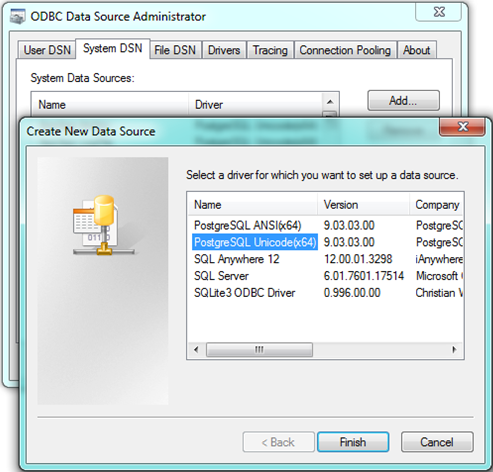
Warning: Both 32 and 64-bit ODBC Administrators exist in 64-bit OS Windows. DSN record must be created in the 32/64 ODBC Administrator, depending on the version of D2000 DBManager (as 32-bit applications cannot use 64-bit DSN and vice versa).
In case of selecting more types of DSN recordsdrivers for PostgreSQL are installed, the user should select the one which contain that contains Unicode in the name.
The configuration of the DSN record for PostgreSQL should be done according to these steps:
- Write, correctly, Specify these parameters in the main window:
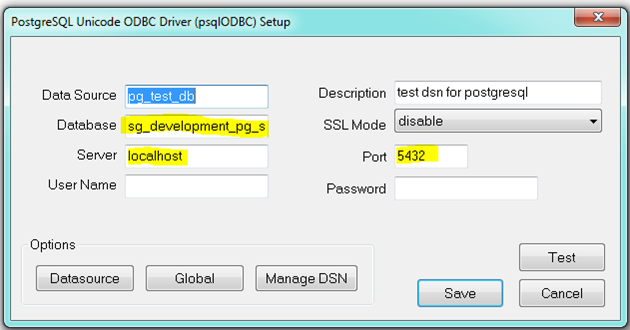
Database – name of existing database.
Server – address of the server, on which the PostgreSQL service runs on (or localhost in case of the same computer),
Port – port number, which PostgreSQL service listens on.
After
After entering the name and password and clicking the Test button, D2000 should connect to the database successfully. If the connection failedfails, you must check the entered data and settings of the PostgreSQL service, on which the database runs on is located (see the section Connection to the PostgreSQL database running on a dedicated machine). Warning! For security reasons, do not keep the name and password filled in the final state!
For
For proper functioning with the D2000 System, it is necessary to change other default parameters.
- In the Datasource/Page1 tab, set the following parameters:
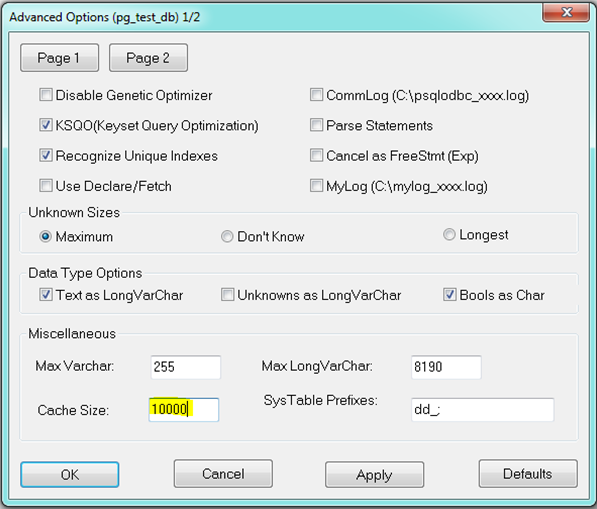
CacheSize can be set at your discretion. - In the Datasource/Page2 tab, keep these settings:
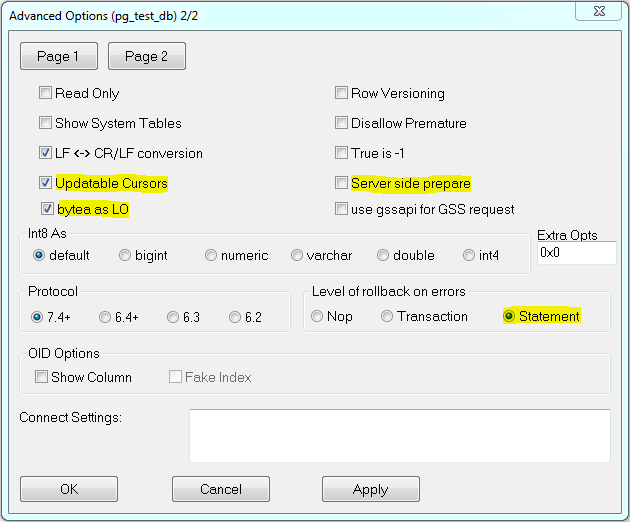
The highlighted parameters must be set as follows:
Updateable Cursors – – the ability to use cursors to writes for writing (enables updateable cursor emulation in the driver)
bytea as LO - enables support for writing Large Objects (blobs) into bytea columns
Server side prepare - compiled cursors (e.g., for parameterized queries) on the server side can improve performance. If possible, we recommend that you enable this option.
Level of rollback on errors - if transaction operations are used and there may be an error during command execution (e.g., INSERT fails because of a unique index violation), then if the parameter is set to Statement, only the last command is rolled back. If the parameter is set to Transaction, the entire transaction is rolled back. On the other hand, the Statement setting makes "microcommits" (savepoints) after each operation, which both reduces performance and consumes transactional IDs, which in turn leads to increased vacuuming activity of the PostgreSQL database.
This DNS record DSN record can be used for connection to an external PostgreSQL database in the D2000 System.
| Kotva | ||||
|---|---|---|---|---|
|
...
In If the event that D2000 System should connect to the remote server, it is necessary to configure DNS the DSN record in the ODBC administrator on the client according to the the previous instructions, with the only difference - into Server parameter enter the name or IP address of the server, on which the PostgreSQL database runs on, into the Server parameter.
On a dedicated machine with the a running database, which you want to connect to, you must properly define the rights for connection. Default The default settings of PostgreSQL enables enable connection to the running database service only from the computer on which it is started. When necessary to connect from the network, you must change this setting by in the configuration file pg_hba.conf, which is placed in the selected directory of the database service.
It contains this these default settings:

This setting enables connection to the database server only for the user from the same computer (127.0.0.1 represents the localhost).
...
If the user wants to connect from any computer, the configuration file must contain this line:
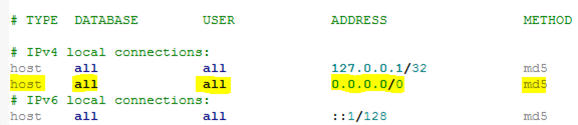
This line enables to connect connecting all users to all databases of the running service from all addresses. However, the password is required (md5 method).
...
The setting, mentioned above, has the an illustrative character, and it is not recommended for use on the production systems because it can represent a security risk when using the weak passwords. The configuration file pg_hba.conf enables to limit the assigning limiting the rights for connection to the database (based on the user or database), which can be found for example on this link httpis documented by https://www.postgresql.org/docs/9.4current/static/auth-pg-hba-conf.html.
Each change of this configuration file requires reloading of the configuration (Reloading of the configuration database service) , or restarting the database service.
...
Specialities of PostgreSQL
...
Using the quotation marks for
...
names of tables and columns
The identifiers of tables and columns in PostgreSQL, which are not in quotation marks, are not case sensitive. It means , the column can be created in this way:
...
Then, these queries can be created:
- select id from t
- select Id from t
- select ID from t
- select "id" from t
All forms of querying of the given column are functional.
The identifiers of tables and columns can be written in quotation marks, too. However, within queries, the identifier must have use the same size of characters letter case as when it was created, and always it must always be in quotation marks.
It means, when creating this column:
...
it is possible to refer to it only in the same letter case format:
select "Id" from t
Any other format of this record Using any other case (eg. "ID") will not work.
In regard of complications, which Considering the complications that can occur in case of using the identifiers with quotation marks, we do not recommend to use using this format of entry. In some situations, this format is necessary, e.g., if the name of the column is the same as some key word identical to a keyword in PostgreSQL.
When using the application database in the D2000 Systemsystem, we do not recommend to use using the identifiers in quotation marks. D2000 System supports both formats of entries, but when using quotation marks, it they must be used even in selection and sorting conditions. This can relate to both the using use of database operations in ESL scripts (with WHERE conditions), and displaying a database table in D2000 HI (if some selection or sorting condition is entered).
D2000 Dbmanager supports the /NQ startup parameter, which disables the use of quotation marks for PostgreSQL databases (and thus case sensitivity in table and column names). We recommend its use.
| Info | ||
|---|---|---|
| ||
...