...
- Copy the files from D2000_EXE\tcl\war\ into the directory of application in web server.
- Create a service
"tcts.exe --WS<host>:<port>"and Watchdog (WD) for this service.
<host>:<port> is name of computer (or IP address), on which WEB server runs,
<port> is number of IP port, on which tcts communicates with servlet (a default is 7120)
Create a configuration with the utility scsconfig.exe: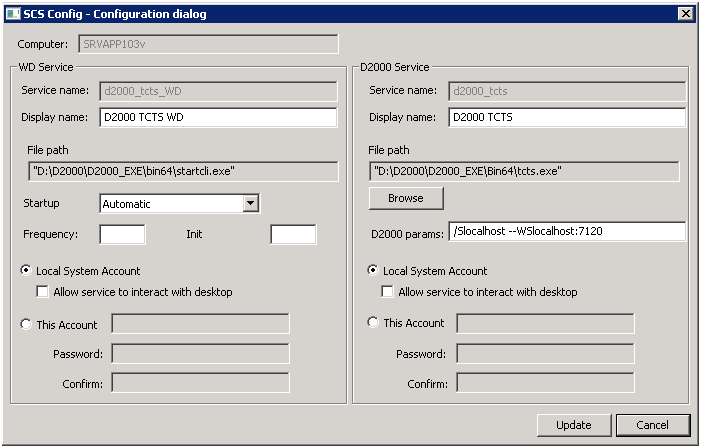
Start the tcts service. - Create the service for automatic synchronization of bitmaps
"tcldeployer.exe --WS<host>:<port>"and Watchdog (WD) for this service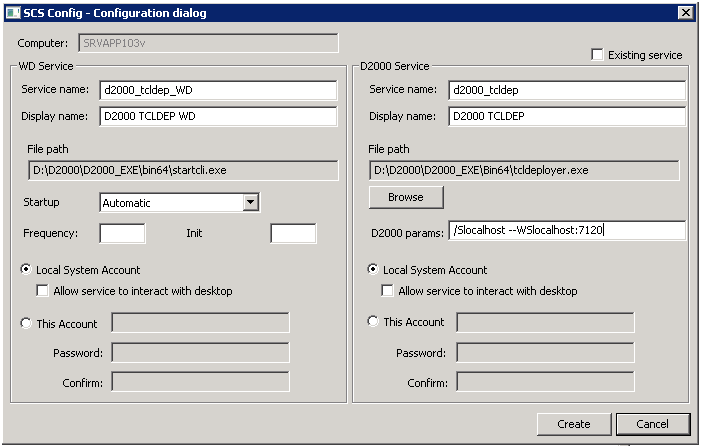
Start the tcldeployer service. - If ESL support is required:
- Create the service
"event.exe /WTCL_LOCAL --SES_LOCAL"and Watchdog (WD) for this service,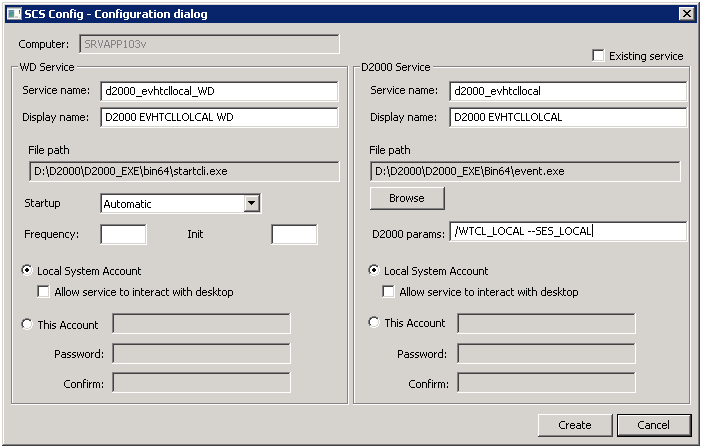
Start evhtcllocal service. - Create the service
"event.exe /WTCL_REMOTE --SES_REMOTE"and Watchdog (WD) for this service, but only if the pictures in the application use the remote ESL scripts.
- Create the service
...
__d2tcl__NickName=nickname
parameter allows to name the .SEE D2000 process, which originates by connecting the client and it is used to interpret ESL scripts of displayed pictures. It can be used for debugging an ESL script when it is needed to specify on which .SEE process should the debugging run at.
__d2tcl__AuthMethod=method
parameter allows to set authentication method. Allowed methods are:
d2000- authentication using name and passwordspnego- authentication by operating system, without entering name and password
It is possible to specify both methods, separated by comma. It this case the 'spnego' authentication is tried first, should it fail, the 'd2000' method is used as the fallback.
If the parameter is not specified, default is 'd2000'.
Feature is available since D2000 release R067
The parameters in URL are entered after '?' character and are divided separated by '&' character.
Example of URL with parameters:
...
http://hostname[:port]/myApp/[?alias]
| hostname | IP address or computer name on which Apache Tomcat runs. |
| port | Port number for connection to Apache Tomcat through HTTP(S). If port = 80, the user need not enter it. |
| myApp | Directory name in the main directory of Apache Tomcat (folder of Thin Client application). |
| alias | Alias name from configuration file. If the alias is entered, it must follow the "?" character. |
If the picture is not opened, when first starting the Thin Client, try to restart both the web server and tcts.exe process.
...
- Stop Tomcat server.
- Copy the files from D2000_EXE\tcl\war\ into the application directory on web server (the directory name must be reserved for this TCL instance, e.g. webapps\mojaNovaApp.
- Create the service
"tcts.exe --WStomcatHost:port"and Watchdog (WD) for this service.
tomcatHost is a server name, on which Tomcat instance runs,
port is an idle number of communication port between tcts and D2WTC, e.g. s7121, 7122, 7123, ..
The first TCL instance uses the port 7120, unless specified in other way. - Create the service "tcldeployer.exe --WStomcatHost:port" for the automatic synchronization of bitmaps and Watchdog (WD) for this service. The port number is the same as mentioned in the step 3.
- The configuration of port of deployed application on the application server means the servlet-init of the parameters. In this case, the number of D2000 communication port is entered as init parameter for the servlets GWTTCLServiceImpl and GWTTCLServiceImpl2 in the files WEB-INF/web*.xml.
An example of configuration:
  <servlet>
    <servlet-name>GWTTCLServiceImpl</servlet-name>
    <servlet-class>sk.ipesoft.d2wtc.servlet.D2WASServiceImpl</servlet-class>
    <init-param>
     <param-name>d2000_servlet_log_dir</param-name>
     <param-value></param-value>
    </init-param>
    <init-param>
     <param-name>d2port</param-name>
     <param-value>7121</param-value>
    </init-param>
   <load-on-startup>1</load-on-startup>
  </servlet>
- Create the service event.exe as necessary.
- New TCL instance will be available on URL:
http://hostname[:port]/mojaNovaApp/[?alias]
...