...
- standard IEC 60870-5-101:2003 in modes both "unbalanced" (master and slave) and "balanced" modes,
- redundancy of communication lines according to the so-called Norwegian convention (Norwegian IEC 870-5-101 User Conventions).
...
| Kotva |
|---|
| komunikacna_linka |
|---|
| komunikacna_linka |
|---|
|
Communication line configuration
...
Line categories:
Implementation is, according to the IEC870-5-101 standard, as follows:
- Originator The originator ASDU address is not present.
- ASDU address is 1 byte, it is defined as the station address. ASDU addresses of all stations on one line must be different.
- Cause The cause of transmission is 1 byte (does not contain the Originator ASDU address).
- Information The information object address is 2 bytes, it is defined as an I/O tag address.
...
If you require the system-redundant communication, use the line category SerialOverUDP System&Line Redundant or Serial System&Line Redundant line categories. Providing that, this communication should be also network redundant, enter "Secondary line" for both "A System" and "B System". This configuration then works in such a way that it concurrently sends and receives data from two systems and each is network-redundantly connected in compliance with the so-called Norwegian convention (Norwegian IEC 870-5-101 User Conventions).
...
- Communication protocol "IEC 870-5-101 balanced", "IEC 870-5-101 unbalanced primary (Master)" or "IEC 870-5-101 unbalanced secondary (Slave)".
- Station The station address is a decimal number in the range 0 - 255 and is used in the protocol as the ASDU address. It can be specified as a decimal number or as a hexadecimal number with a hash at the beginning (e.g. #0A).
- The synchronization of the station real-time The synchronization of the station real-time may be enabled also for the protocols "master" and "balanced - station A (controlling)". Set the synchronization period to a nonzero value. The synchronization is executed by ASDU 103 "Clock synchronization command" in the local time according to settings of the D2000 System.
...
The Browse button opens a browsing dialog for the station address. If the communication is functional, a dialog with the ASDU addresses received so far is displayed. The Refresh button can be used to clear the list of received ASDU addresses.
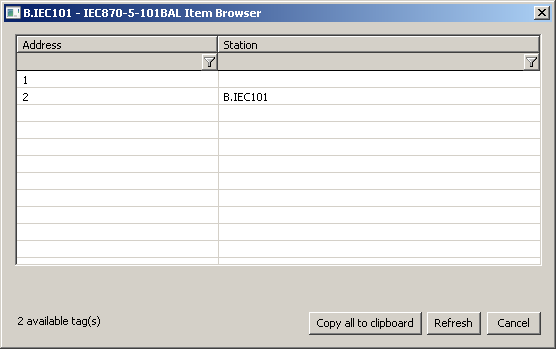 Image Added
Note: in the case of the "slave" and "balanced" protocols, if an Interrogation (ASDU 100) or Counter Interrogation (ASDU 101) command arrives for the "broadcast" address (hexadecimal FF or FFFF according to the Link Address parameter), data from all stations will be sent.
| Kotva |
|---|
| linka_parametre |
|---|
| linka_parametre |
|---|
|
Line protocol parameters...
Configuration dialog box - tab Protocol parameters.
They influence some optional parameters of the protocol. The following station protocol parameters can be set:
Table 1
| Parameter
| Meaning
| Unit
| Default value
|
|---|
| Link Address | Common link address. | - | 1 |
| Length of ASDU Address | Length of ASDU address. | 1/2 byte(s) | 1 |
| Length of Link Address | Length of common link address |
Configuration dialog box - tab Protocol parameters.
They influence some optional parameters of the protocol. Following station protocol parameters can be set:
Table 1
ParameterMeaningUnitDefault value| Kotva |
|---|
la | la | Link AddressCommon link address. | - | 1 | | Kotva |
|---|
lasdu | lasdu | Length of ASDU AddressLength of ASDU address. | 1/2 byte(s) | 1 | | Kotva |
|---|
lla | lla | Length of Link AddressLength of common link address. | 1/2 byte(s) | 1 | | Kotva |
|---|
lioa | lioa | Length of Info Object AddressLength of info object address. | 1/2/3 byte(s) | 2 | | Kotva |
|---|
| lcot | lcot | Length of Cause Of TransmissionLength of "Cause Of Transmission".1/2 byte(s) | 1 |
| Retry CountLength of Info Object Address | Length of info object address. | 1/2/3 byte(s) | 2 |
| Length of Cause Of Transmission | Length of "Cause Of Transmission". | 1/2 byte(s) | 1 |
|
| Retry Count | The delay between Delay between request retry in case of a communication failure. | - | 2 |
| Retry Timeout | Delay The delay between retry of call in case of a communication error. | ms | 100 millisecond |
| Wait First Timeout | Delay after sending the request before reading the response. | ms | 100 millisecond |
| Wait Timeout | Delay between response readings till its completinguntil it is completed. | ms | 500 millisecond |
| Max. Wait Retry | Retry count of response reading till its completinguntil it is completed. | - | 6 |
| No Data Timeout | Delay of next call "Request user data class 1/2" if no data have been received (only master). | ms | 300 millisecond |
| Inactivity Timeout | Interval of connection monitoring. If no valid data have not been received, station status will pass go to a communication error. Switching of redundant devices in case of SerialOverUDP Device Redundant line (only slave). | ms | 5 sec. |
| Moxa Timeout | Interval of The switching interval of the redundant devices MOXA NPort in case of communication error (only master, balanced). | sec. | 10 |
| Source Flags | Set flags FI..FL according to the source of line. If SerialOverUDP System+Line Redundant is used, the values will have these flags:- System A, primary line: FI
- System A, secondary line: FJ
- System B, primary line: FK
- System B, secondary line: FL
Note: Flag was used in communication with redundant systems to distinguish the wrong values that were sent by a partner system, which was supposed to be passive and not to send nothing. | - | NO |
| No Output Flags | Activation of parameter results in ignoring of flags FA..FH for output I/O tags. If this parameter is turned off, flags FA..FH are mapped to individual bits of a quality byte. | - | NO |
| Link Test Timeout | Interval of request sending "Test function for link" if timeout elapsed and no data telegrams was were transferred (only balancedbalanced only). | sec. | 10 |
Single Value In Spontaneous Answer | When sending spontaneous changes, these will be sent one-per-ASDU and they will not be cumulated into longer packets. Parameter The parameter was implemented to handle a bug in a particular TM1703mic. | - | NO |
| The class used for sending data (slave only | slave). IEC 101 Master sends Class1 (high priority) and Class2 (normal) read data requests. Slave responds to them with data or a message that it has no data. In both Class1 and Class2 | response responses there is an ACD flag that the slave has Class1 data available. If set, the IEC 101 Master will then request Class1 data. The parameter affects behavior as follows: - Class1&2 - IEC 101 Slave responds to Class1 and Class2 requests with data. The ACD flag sets if it has additional data.
- Class1 - IEC 101 Slave sends all data as Class1 and responds to the Class2 requests that it has no data. The ACD flag sets if it has additional data.
- Class2 - IEC 101 Slave sends all data as Class2 and responds to the Class1 requests that it has no data. The ACD flag sets to 0 (it does not have Class1 data).
- Prio reply - IEC 101 Slave sends responses to command ASDUs as Class1 data and other ASDUs (value changes, responses to Interrogation) as Class2.
| The default value of the parameter is Class1.
- Note: The responses to Interrogation (ASDU 100) and Counter Interrogation (ASDU 101) commands and all the values sent as a part of the response are also sent as Class1 data.
The default value of the parameter is Class1. | - | Class1&2
Class1
Class2
Prio reply |
| Discard received data before sending a response (only slave). If a correct request is received and the IEC 101 Slave wants to send a response, it will clear the incoming queue before sending, if the queue has data in it. This parameter serves as a protection against various data duplications due to communication | partners partner errors (e.g. OSI Monarch with RtuPing running during switching of active communication line). | - | NO |
| cmdc | cmdc | Send Confirmation CommandFilter Spontaneous Values Filtering multiple spontaneous values of the same I/O tag when sending Type of sent confirmation to write value (only slave, balanced). | -
7(CONF)
10(TERM)
7(CONF) and 10(TERM) | 7(CONF) | | Kotva |
|---|
If some I/O tags change so fast that there would be multiple values of the same I/O tag in one response to a data request, activating this parameter causes only one (latest) spontaneous value to be sent. See also the description of the Filter Minimum parameter.
Note: the filter does not affect the sending of commands (ASDU 45 and above). |
| NO |
| The number of requests in the output queue at which value filtering is activated, if enabled by the Filter Spontaneous Values parameter. This parameter allows value filtering to be activated only in error conditions (e.g. excessive value generation in the D2000 CALC process) and not during normal operation. | - | 0 |
|
| Send Confirmation Command | Type of sent confirmation to write value (only slave, balanced). | -
7(CONF)
| acc | acc | Accept Confirmation CommandType of record confirmation to be accepted successfully (only master, balanced). | -
7(CONF)
10(TERM)
7(CONF) or 10(TERM)
7(CONF) or and 10(TERM) | 7(CONF) |
| Max. MTUAccept Confirmation Command | Type of record confirmation to be accepted successfully (only master, balanced). | -
7(CONF)
10(TERM)
7(CONF) or 10(TERM) | 7(CONF) or 10(TERM) |
| Max. MTU | Limitation of data Limitation of data packet size (only slave, balanced). | bytes | 220 |
| Phys. Trans. Direction | Setting a bit DIR in balance mode (only balanced). | Station A(Controlling)
Station B(Controlled) | Station A(Controlling) |
| Single Byte Ack | Send single-byte ACK preferentially (0xE5). | YES/NO | NO |
| Interrog. Covers Counters | Send the call 100 and counter values on general interrogation (only slave, balanced). | YES/NO | YES |
| Send EOI | Send "end of interrogation command" to all ASDU (only slave). | YES/NO | YES |
| sisd | sisd | Send Interrog. in Sec. Direct.If the value of the parameter is "1 - IC/CIC after EOI", then after receiving ASDU 70 (End of initialisation) the Interrogation Command will be sent again. The default value "0 - no IC/CIC after EOI" will cause ASDU 70 to be ignored.
Note: this parameter was implemented for SAT RTUs. | - | 0 |
| Send Interrog. in Sec. Direct. | Send general interrogation command in case of slave or balanced controlled station B (only slave, balanced). | YES/NO | Send general interrogation command in case of slave or balanced controlled station B (only slave, balanced). | YES/NO | NO |
| Communication for system the Sinaut Spectrum system, which requires non-standard behavior on redundant lines (different from the Norwegian convention). | YES/NO | NO |
System Redundancy: Manages A Status Address | Address of station and output I/O tag with the status of system redundancy. The format of the address is Station Address, I/O tag address, for example. "1,1003".
| Parameter The parameter is useful for SerialOverUDP System&Line Redundant lines, which enable communication with two independent control systems (e.g. main dispatching SED in Žilina and backup dispatching SED in Bratislava).
| Parameter The parameter enables one to ignore values that are received from the control system, which is inactive just now, providing that the application knows which one is active or inactive. It can know it e.g. based on the value of the input I/O tag with the defined value.
This feature (information about active control system) will work | providing provided that the station with the output I/O tag of Dout type | exist exists with the same addresses as is defined in this parameter and the application must write True into it if "System A" is active, or False if "System B" (configured on the system redundant line) is active. | - |
|
|
| fd | fd | Full DebugIf Ignore Unknown Addresses=TRUE, the D2000 KOM process will not show an error on its console or write it into log files in case the incoming value has the address not matching any of the addresses of I/O tags defined in the D2000 system. | - | False |
| Full Debug | A high level of communication tracking, the received values of I/O tags, and other debug information is shown. | High level of communication tracking, the loaded values of I/O tags and other debug information are shown. | YES/NO | NO |
I/O tag configuration
...
I/O tag address is a numerical address of data object IOA (in the range 0 - 65535). It can be specified as a decimal number or as a hexadecimal number with a hash at the beginning (e.g. #0A).
The I/O tag with an address starting with %IGNORE will be ignored.
In the case of command direction in master or balanced mode, it is necessary to configure je a proper ASDU type:
| ASDU type | I/O Tag type |
|---|
| 45 - Single command | Dout |
| 46 - Double command | Dout, Co |
| 47 - Regulating step command | Dout |
| 48 - Set point command, normalised value | Ao |
| 49 - Set point command, scaled value | Co |
| 50 - Set point command, short floating point value | Ao |
| 51 - Bitstring of 32 bit | Co |
| 58 - Single command with time tag CP56Time2a | Dout |
| 59 - Double command with time tag CP56Time2a | Dout, Co |
| 60 - Regulating step command with time tag CP56Time2a | Dout |
| 61 - Set point command, normalised value with time tag CP56Time2a | Ao |
| 62 - Set point command, scaled value with time tag CP56Time2a | Co |
| 63 - Set point command, short floating point value with time tag CP56Time2a | Ao |
| 64 - Bitstring of 32 bit with time tag CP56Time2a | Co |
...
Note 1: Individual bits of bytes which determines a quality byte (SIQ for ASDU 1,2,30; DIQ for ASDU 3,4,31; QDS for 5-14,20,32-36) set the attributes FLA (0.bit), FLB (1.bit) ..FLH (7.bit).
Example:
for ASDU 4: FLA=DPI bit 0, FLB=DPI bit 1, FLC=0, FLD=0, FLE=BL bit, FLF=SB bit, FLG=NT bit, FLH=IV bit.
for ASDU 16: FLA..FLE Sequence number bity bits 0..4, FLF=CY bit, FLG=CA bit, FLH=IV bit
And
Moreover:
- if bit IV (Invalid) is set, the status of value will be Invalid
- if one of bits the NT (Not topical), SB (Substituted), BL (Blocked), OV (Overflow), CA (Counter adjusted), or CY (Counter overflow) is set for proper bits are set in their respective ASDU types, the status of value will be Weak.
* - T-bit from
the value of ASDU sets the attribute FI into
the value of I/O tag which has value type Ci/Ai and they are interpreted as
figures numbers -64 up-to +63.
** -
ASDU 17 and
38:
the value of
SEP byte
SEP sets the attributes FLA (0.bit), FLB (1.bit) up-to FLH (7.bit), following 2 bytes (CP16Time2a) are interpreted as
a positive number (0-60 000) into
the value of I/O tag with value type Ci/Ai or as
a relative time (0-60 seconds) into
the value of I/O tag with
TiR value type
TiR.
*** -
ASDU 18,
39 and
40: value of
byte SPE(ASDU 18,39) or OCI (ASDU 40)
byte sets the attributes FLI (0.bit), FLJ (1.bit) up-to FLP (7.bit).
Value The value of byte QDP sets the attributes FLA (0.bit), FLB (1.bit) up-to FLH (7.bit), following 2 bytes (CP16Time2a) are interpreted as
a positive number (0-60 000) into
the value of I/O tag with value type Ci/Ai or as
a relative time (0-60 seconds) into
the value of I/O tag with
TiR value type
TiR.
Note 2: When using the system and line redundant categories of lines, the status of line and station is formed by a logical sum of all used elementslines. It means, that if the redundant system consists of four lines and just one line is working, the status of the station and line is all right. The status of lines is presented with the help of special input or output I/O tag (of integer and real type, i.e. Ai/Ao/Ci/Co). Name The name of this I/O tag has this format: [line_name of line]_SystemStatus (e.g. for line L.Test it is M.Test_SystemStatus). The value of the I/O tag represents the binary format of the status of N-tuple lines. If the first three lines are okay but the last one does not work (SystemB/SecondaryLine) i.e. [FALSE, TRUE, TRUE, TRUE], I/O tag has the value 0b0111, i.e. 7.
The order of lines mapped to individual bites bits is [SystemB/SecondaryLine, SystemB/PrimaryLine, SystemA/SecondaryLine, SystemA/PrimaryLine]., SystemA/SecondaryLine, SystemA/PrimaryLine].
Browse
For the I/O tags, it is possible to discover the list of objects, as long as the KOM process is running and communication with a station is established.
Clicking the Browse button opens the IEC870-5-101 Item Browser window and displays a list of objects that have been read so far. The object list is created dynamically as a result of received messages.
The list of objects is dynamic, i.e. when a new value arrives in the KOM process, it is updated. Filtering in individual columns is also supported, asterisks can be used in the mask (e.g. *Short*).
Double-clicking on a particular line will cause the Address parameter to be inserted into the configuration of the I/O tag from which the IEC870-5-101 Item Browser window was opened.
The Refresh button clears the list of values in both the CNF and the KOM process.
The Value column contains the received value.
The Value column contains the received value, and the Time column contains the received timestamp. The Point column contains the name of the I/O tag that has this address (if there is one).
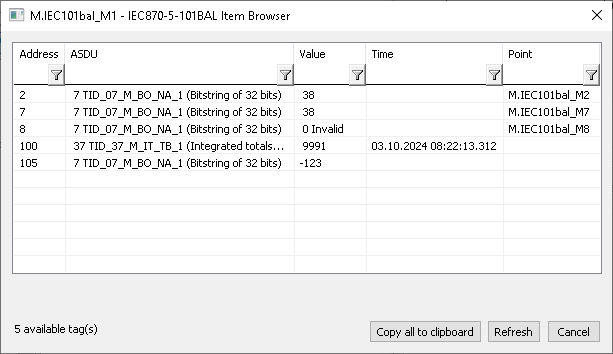 Image Added
Tell commands
...
- Telecontrol equipment and systems Part 5-101: Transmission protocols – Companion standard for basic telecontrol tasks (IEC 60870-5-101:2003), http://www.iec.ch.
- Telecontrol equipment and systems Part 5-2: Link transmissions procedures (IEC 60870-5-2:1992), http://www.iec.ch.
- Norwegian IEC 870-5-101 User Conventions, Approved version Revision no. 2.0, http://www.statnett.no.
| Info |
|---|
|
You can read blogs about about the IEC 870-5-101 protocol (for now, in Slovak language only): |
...
Changes and modifications
...
- June , 2015 - implemented Source Flags parameter
...
- Ver. 1.0 - November 22nd, 2007 - document creating
- Ver. 1.1 - April 22nd, 2009 - document updating
- Ver. 1.2 - June 8th, 2015 - new parameter implemented
- Ver. 1.3 – June 15th, 2020: browsing support
...