- Click the button
 New object in the selection window.
 - In the following opened dialog box, define the basic parameters of the new object - name, type, parent object or sample object.
...
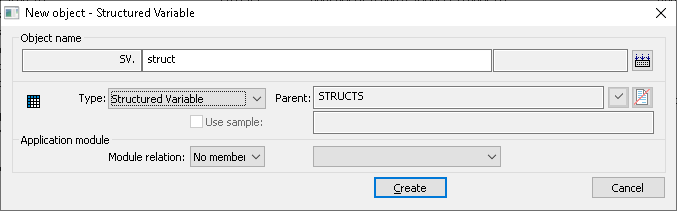
Object name
Each object in the system D2000 has its name, that uniquely identifies it.
...
The complete object name consists of four basic parts:
module.prefix.name.suffix
A name , entered in the input field Object name, is automatically extended with the prefix, suffix, and module name to which it belongs to, after defining the object type (Type item). Prefix Both prefix and suffix depend on the application configuration.
For names of all objects, there are valid the same rules for entering apply (the name means complete object name including prefix and suffix):
- Names of objects Object names are in the form of ASCII strings.
- Maximum The maximum length of the object name is 64 characters (objects of Application module type - 15 characters).
- Each object name must begin with a letter.
- Object name names can contain letters (A up to Z), numbers (0 up to 9) and , and these special characters: point (.) and underscore (_).
The button  is used to check the object name. Letters with diacritics will be replaced by letters without diacritics, slashes/backslashes by periods, and other characters by underscores.
Type
Defines the object type. Object type is selected from the list of available object types. The list is in alphabetical order.
Note: After opening the dialog box, there is shown the same object type as the object type in the selection window.
...
The parent object selection. The relations Parent-Child within the frame scope of the object architecture of the D2000 system you can find in the topic be found under the topic DODM architecture layout.
If the checkbox Use sample is enabled, the parent will be entered the same as it is for the sample object.
...
Deletes the selected parent and sets the default one.
Use sample
If any an object was is selected in the selection window, it will be offered as the sample object for the new one. I f If the checkbox Use sample is enabled, the features attributes of the new object will be equal to copied from the sample oneobject.
Module relation
Object classification to the application module and type of its membership:
- No member
- Private
- Public