List of alarm objects
Clicking the button All alarms in the Alarm list window (the Critical and Uncritical tabs) opens the following window containing a list of all alarm objects defined in D2000 system (objects of Alarm, I/O tag, Eval tag, Switch and System type).
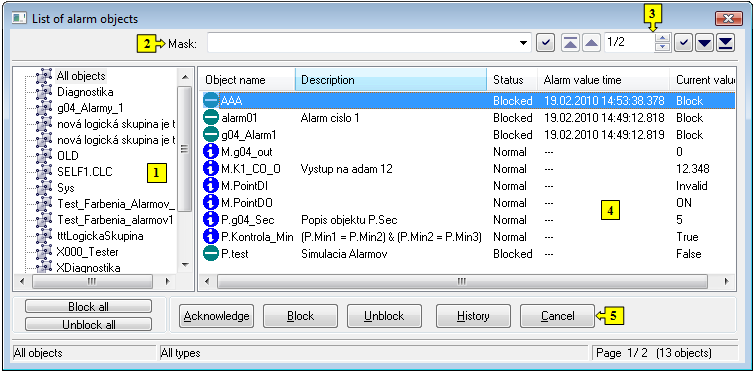
The List of alarm objects window consists of 5 basic parts:
- tree view of alarm groups (1)
- mask (2)
- paging buttons (3)
- list of alarm objects (4)
- control buttons (5)
| Kotva | ||||
|---|---|---|---|---|
|
...
After choosing one of the defined alarm groups, the contents of the list of alarm object (4) is reduced to the alarms that belong in selected logical group. Alarms not included in any alarm group are assigned into the Unfiled object alarm group.
Note: In contrast to the Alarm list, the tree view contains all logical groups in the D2000 system, i.e. logical groups as well as alarm logical groups.
...
Mask allows more quick searching for the objects, names of which contains some common characters. A mask is defined by typing into the input field and pressing the button  .
.
You can use special characters in masks that are described in the following table.
| Character | Meaning |
|---|---|
| * | Substitutes arbitrary number of characters. |
| ? | Substitutes just one character. |
| [characters] | Allows to enter a few characters (without delimiter), that may occur on specific position. |
| [^characters] | Allows to enter a few characters (without delimiter), that may not occur on specific position. |
Only the objects with names matching given mask will be included in the list of objects.
...
If the list of alarm objects (4) is longer than the window's size, then the list is divided into several pages. You can use the buttons placed in the right top part of window to switch among them.
 | Go to the first page of the list. |
 | Go to the previous page of the list. |
 | Number of the current page / number of all pages. |
| Go to page entered in the input field of current page using the narrow buttons placed right, eventually directly enter the number of page. |
 | Go to the following page of the list. |
 | Go to the last page of the list. |
 | Go to the previous parent list. |
| Kotva | ||||
|---|---|---|---|---|
|
...
The list consists the following columns and there is displayed particular alarm graphic symbol before object name:
| Object name | Name of the object of Alarm type or name of the object or the object the process alarm is defined for. |
| Description | Description of the object of Alarm type or description of the object the process alarm is defined for. |
| Status | Status of the object of Alarm type or of the object of Alarm type or status of the object the process alarm is defined for. |
| Alarm value time | Time when the status of the object of Alarm type changed to the Alarm state. |
| Current value | Current value of the object. |
Jump to the following / previous page of the list
...
| Kotva | ||||
|---|---|---|---|---|
|
...
The List of alarm objects comprises the following buttons:
- Block all - blocks all alarms
- Unblock all - unblocks all alarms
- Acknowledge - acknowledges selected alarm
- Block - blocks selected alarm
- Unblock - unblocks selected alarm
- History - shows the object's history. Clicking the button opens the System logging dialog box.
- Cancel - closes the window
Note: The presence of the buttons Acknowledge, Block and Unblock depends on the status of selected object(s).