...
- D2000 GateWay Server is started only on one computer with the start parameter /RD . This causes the process to try to be constantly connected to current HOT D2000 Server and reconnect after another D2000 Server becomes HOT.
This solution is suitable if there is a computer serving as a "gateway" for access to the application Appl2. On this computer the process D2000 GateWay Server is running.
This mode of operation creates a non-redundant point in connection between Appl1 and Appl2 (a possible single point of failure).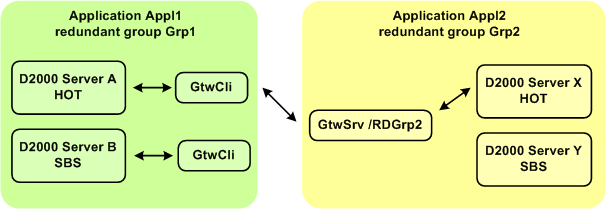
- D2000 GateWay Server is started on every application server in redundant group Grp2 (with the start parameter /S or without it if it runs on the same computer as D2000 Server). In this mode D2000 GateWay Server disconnects D2000 GateWay Client if the server D2000 GateWay Server is connected to is not HOT.
In this mode the process D2000 GateWay Client must be run with multiple parameters /GTWC<ipAddress:portNr> using IP addresses or names of all computers running D2000 GateWay Server processes in redundant group Grp2.
Example:- Server X: IP address 10.0.1.1
- Server Y: IP address 10.0.1.2
Processes D2000 GateWay Client on computers Server A and Server B are run as gtwcli.exe /GTWC10.0.1.1:5555 /GTWC 10.0.1.2:5555
If the computer running D2000 GateWay Server process has more than one network interface (redundant network), it is possible to specify IP addresses of more interfaces and utilize the redundancy of the networks.
Example:- Server X: IP addresses 10.0.1.1 and 10.0.2.1
- Server Y: IP addresses 10.0.1.2 and 10.0.2.2
Processes D2000 GateWay Client on computers Server A and Server B are run as
gtwcli.exe /GTWC10.0.1.1:5555 /GTWC10.0.1.2:5555 /GTWC10.0.2.1:5555 /GTWC 10.0.2.2:5555
This mode of operation does not create a single point of failure and enables to utilize the redundancy of the networks, therefore it is recommended. It is implemented since version 7.01.022.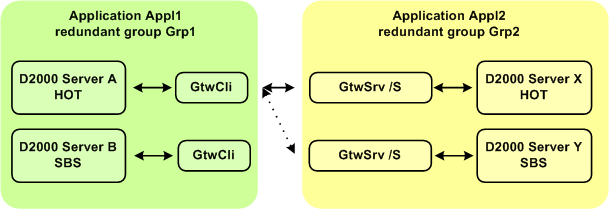
Transfer of historical values changed by the user and from the scriptKotva RouteArchiveMessages RouteArchiveMessages
Using the D2000 Server parameter RouteArchiveMessages, it is also possible to achieve the transfer of changed values (in both normal mode and transparent gateway mode):
- manually: editing/adding/deleting archived object values by the user in D2000 HI
- from a script with the INSERTARCHARR action
- from a script with the DELETEARCHDATA action
- from a script with the UPDATEARCHVAL action
| Info | ||
|---|---|---|
| ||
Remote objects - configuration dialog box |
...