...
In the next step, the installer checks and sets the redirection of registers, as 64-bit operating systems contain both 32-bit and 64-bit registers, which are accessible depending on the running process (32-bit or 64-bit). The D2000 System involves both 32-bit and 64-bit processes, therefore you must set the reading from just one type of the registry. Consequently, the reading is redirected to the registers corresponding to the operating system (i.e. 32-bit system -> 32-bit registers, 64-bit system -> 64-bit registers).
If this message occurs:
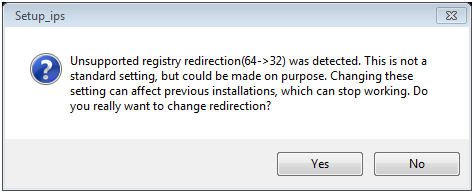
it suggests that the reverse redirection is set (all processes work with 32-bit registers). This means that registry redirection has been set on your computer before but to the opposite of the default value. In this case, the user should consider whether to keep these settings or not. If these settings remain, the D2000 System instances installed in the past are functional, too. However, if no instances are installed, it is better to change this setting to the default value.
This redirect can be changed on 64-bit systems, by changing value of the RegistryViewRedirect from 0 to 1 in registry branch "Computer\HKEY_LOCAL_MACHINE\SOFTWARE\Ipesoft\D2000" and from 1 to 0 in registry branch "Computer\HKEY_LOCAL_MACHINE\SOFTWARE\WOW6432Node\Ipesoft\D2000". The D2000 System is not dependent on the usage of 32-bit or 64-bit registers, but it cannot detect the change of this setting. Therefore, we recommend using the same redirection for all instances of the D2000 System and not changing it.
If this message occurs:
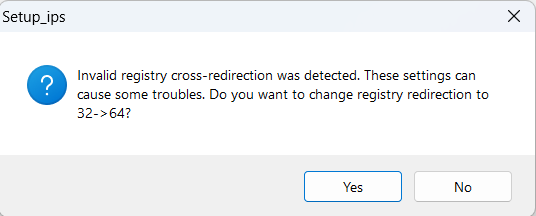
it means that the value of RegistryViewRedirect for both branches is set to 1. With this configuration the D2000 system will be unusable. If user presses "Yes" then the installer will set registry redirect to 64-bit branch. Alternatively user can end the installation prematurely and set values for RegistryViewRedirect in both branches manually.
Warning: The registry settings above mentioned remain changed only if the D2000 System has been modified in a computer (i.e. installed, upgraded, or uninstalled). If the user decides not to do any changes and aborts the installation, the original settings remain.
...