...
Lines of categories TCP/IP-TCP and TCP/IP-TCP Redundant were designed for the needs of communication protocols that are built directly on TCP/IP. Both IPv4 and IPv6 protocols are supported. TLS encryption is also supported, using certificates or pre-shared keys (PSK).
TCP/IP-TCP Redundant line enables the implementation of redundant communication (redundant network lines, redundant network interfaces) and , configuration of two or more IP addresses of a communication partner, and creation of two parallel TCP connections.
The following protocols are supported at the present time:
Line TCP/IP-TCP
- Allen-Bradley CSP/PCC
- Datalogger ESC8816
- DLMS/COSEM
- DNP3
- Ethernet/IP
- General Electric SRTP
- Generic User Protocol
- HART
- IEC 60870-5-104
- IEC 60870-5-104 Server
- IEC 60870-5-104 Sinaut
- IEC 60870-6 ICCP/TASE.2
- IEC 61850
- IoT over LoRaWAN/Sigfox
- Johnson Controls N2-Bus
- KMZ Lite protocol
- KMZ protocol
- KNX protocol
- L&G TOCCATA
- MODBUS Client
- MODBUS Server
- MQTT Client (Message Queue Telemetry Transport)
- Omron FINS
- Orange GDEP
- SAE RTU
- Siemens SAPHIR
- Siemens SIMATIC S7 ISO on TCP
- Telegyr 809 Server
- Teltonika Codec14
...
TCP/IP-TCP line configuration
...
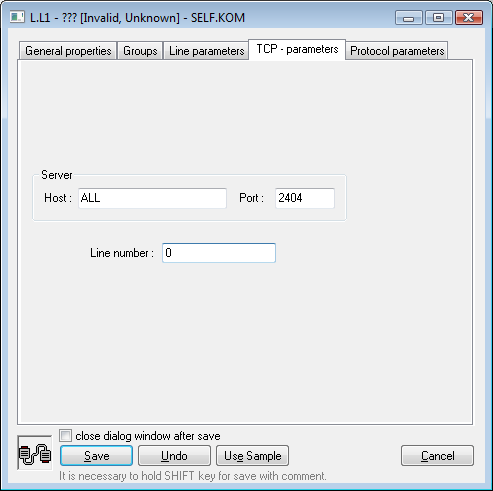
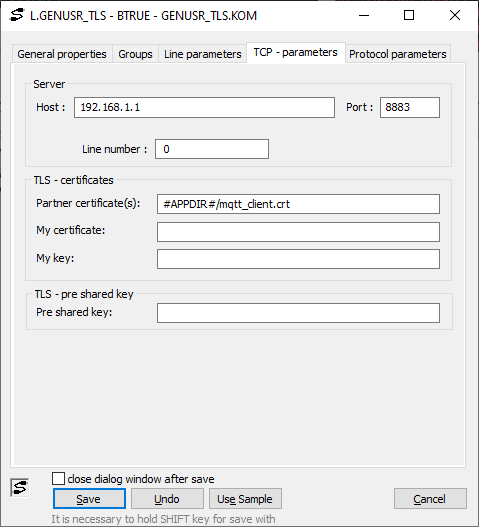
Server
...
section
Host
IP address or network name of a computer. If the name is configured (and not an IP address in the format X.X.X.X), it will be converted into an IP address using the standard name resolution mechanism provided by OS (hosts, DNS, WINS ..).
If a server protocol is configured, the IP address for the KOM process to listen should be configured, i.e. the IP address of one of the computer network interfaces on which the KOM process runs. Example: 127.0.0.1 or localhost (local interface), 192.16.0.1.
Note: It is possible to use symbolic addresses * or ALL (for IPv4 protocol) or [*] or [ALL] (for IPv6 protocol) - in this case, the KOM process listens on a chosen TCP port on all network interfaces which are available.
If the configured protocol is not a server protocol, the IP address of the communication partner to which the KOM process connects should be configured.
Note: If the configured protocol is not a server protocol, for selected protocols, multiple IP addresses or names can be configured (separated by commas or semicolons). The KOM process will cyclically try all configured IP addresses/names when connecting to a communication partner.
...
Port
If a server protocol is configured, enter the TCP port number on which the KOM process should listen. Otherwise, enter the TCP port number of the communication partner to which the KOM process should connect.
...
It is used for the configuration of a specific parameter in selected protocols, in other protocols, it is not used and it can be set to any numeric value (e.g. 0).
"TLS - Certificates" section
Parameters that allow you to configure TLS encryption based on public and private keys. TLS encryption is enabled if the "Partner Certificate(s)" parameter and/or the "My Certificate"/"My Key" pair is configured.
Note: TLS encryption based on shared keys (Pre-shared keys, PSK) takes precedence, so if the "Pre-shared key" parameter is specified, the entire "TLS - Certificates" section is ignored.
Partner certificate(s)
Certificate(s) (public key(s)) used by the other communicating party. This parameter allows you to verify that the other party is trustworthy because it uses one of the configured certificates.
This parameter specifies the path to the certificates. Multiple certificates can be specified and separated by a comma. The path may contain the symbolic constant #APPDIR# indicating the application directory (e.g. D:\D2000\D2000_APP\MyApp).
Example: D:\some.crt,#APPDIR#/another.crt
My certificate
Certificate (public key) used by the D2000 KOM process. The path may contain the symbolic constant #APPDIR# indicating the application directory (e.g. D:\D2000\D2000_APP\MyApp).
Example: #APPDIR#/my.crt
My key
Private key used by the D2000 KOM process. The path may contain the symbolic constant #APPDIR# indicating the application directory (e.g. D:\D2000\D2000_APP\MyApp).
Example: #APPDIR#/my.key
Note: for security reasons, we recommend setting access to the private key so that it is only accessible to the user under which the D2000 KOM process is running (by default Local System on Windows and d2000 on Linux/RPI)
"TLS pre shared key" section
Pre shared key
The shared key which is used to encrypt the communication. This key must be identical on both the D2000 KOM process side and the peer computer side.
TCP/IP-TCP Redundant line configuration
...
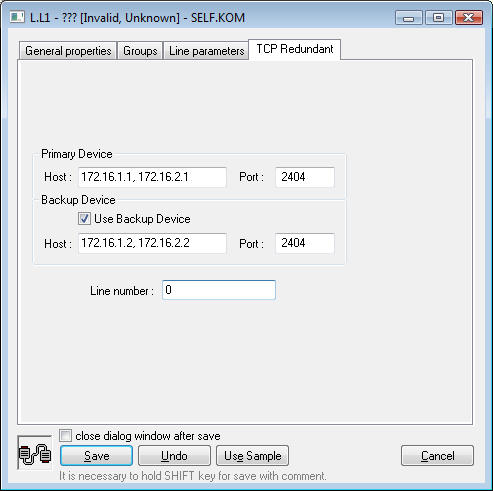
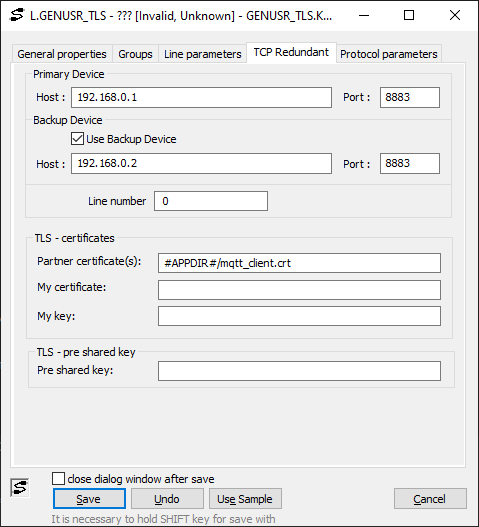
Primary Device
...
section
Host
Primary IP address of the communication partner to which the KOM process connects. If the name is configured (and not the IP address in the format X.X.X.X), it will be converted into an IP address using a standard name resolution mechanism provided by OS (hosts, DNS, WINS ..).
...
Port
A number of the primary TCP port of the communication partner to which the KOM process connects.
Backup Device section
| Kotva | ||||
|---|---|---|---|---|
|
If this option is not selected, the KOM process does not connect to the backup IP address and the line works like a TCP/IP-TCP line, i.e. without redundancy.
...
Host
The secondary IP address of the communication partner to which the KOM process connects. If the name is configured (and not an IP address X.X.X.X), it will be converted into an IP address using the standard name resolution mechanism provided by OS (hosts, DNS, WINS ..).
Note: implementation of redundancy is protocol-dependent. For some of the protocols (e.g. IEC 870-5-104) a parallel connection to the backup device is created. For some protocols (e.g. Modbus Client), the KOM process creates a single connection, alternately (after the connection is broken or cannot be established) using all IP addresses/names configured as Primary/Backup Devices.
...
Port
The number of a backup TCP port of the communication partner to which the KOM process connects.
"TLS - Certificates" and "TLS pre shared key" sections
See the description of the parameters for the TCP/IP-TCP line above.
Note about entering the Host parameter
...