...
A depository database is implemented as an independent database. Names of depository databases are defined by the configuration parameter PG_TrezorName0.
Similarly to Sybase, the configuration of the process D2000 Archiv contains a configured time period TrezorPeriod, during which the process writes data to one depository database. When this period elapses, the database is released and the process starts storing values into a new database. The released database is available for storing delayed data for a given time (configuration parameter TrezorCompressTime). After expiration of this time, a default read-only access is configured for the database (ALTER DATABASE APLIKACIA_TREZOR_#ID# SET default_transaction_read_only = true) and then if value of parameter TrezorCompressOffline=1, access to depository database is forbidden (update pg_database set datallowconn = false where datname = 'APLIKACIA_TREZOR_#ID#'). After disconnecting a depository database, it is possible to run an external program - its name and path are defined by the parameter TrezorPostCompressCmd and its parameters are defined by the parameter TrezorPostCompressPar.
This program can for example move and compress a disconnected depository database or create a dump of read-only depository database via the PostgreSQL utility pg_dump.
Note 1: In order for a database user dba (used by D2000 Archiv to connect to PostgreSQL server), to create and disconnect the databases, it is recommended to grant the dba user a superuser privilege ( ALTER ROLE dba WITH SUPERUSER; ).
Note 2: As every depository database (resp. every depository database segment) is a separate database, which is accessed by the D2000 Archiv via a separate database connection, it is necessary to configure the PostgreSQL server to permit a sufficient number of connections (parameter max_connections), for D2000 Archiv to open a connection to all mounted depository databases.
Note 3: In order for the dba user to be able to create dep;ository databases, it is necessary to give him superuser rights. This can be done from D2SMC from the archive context menu: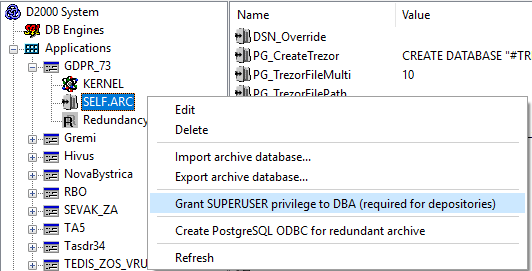
| Kotva | ||||
|---|---|---|---|---|
|
...